 By Ilham Musyafa · October 23, 2026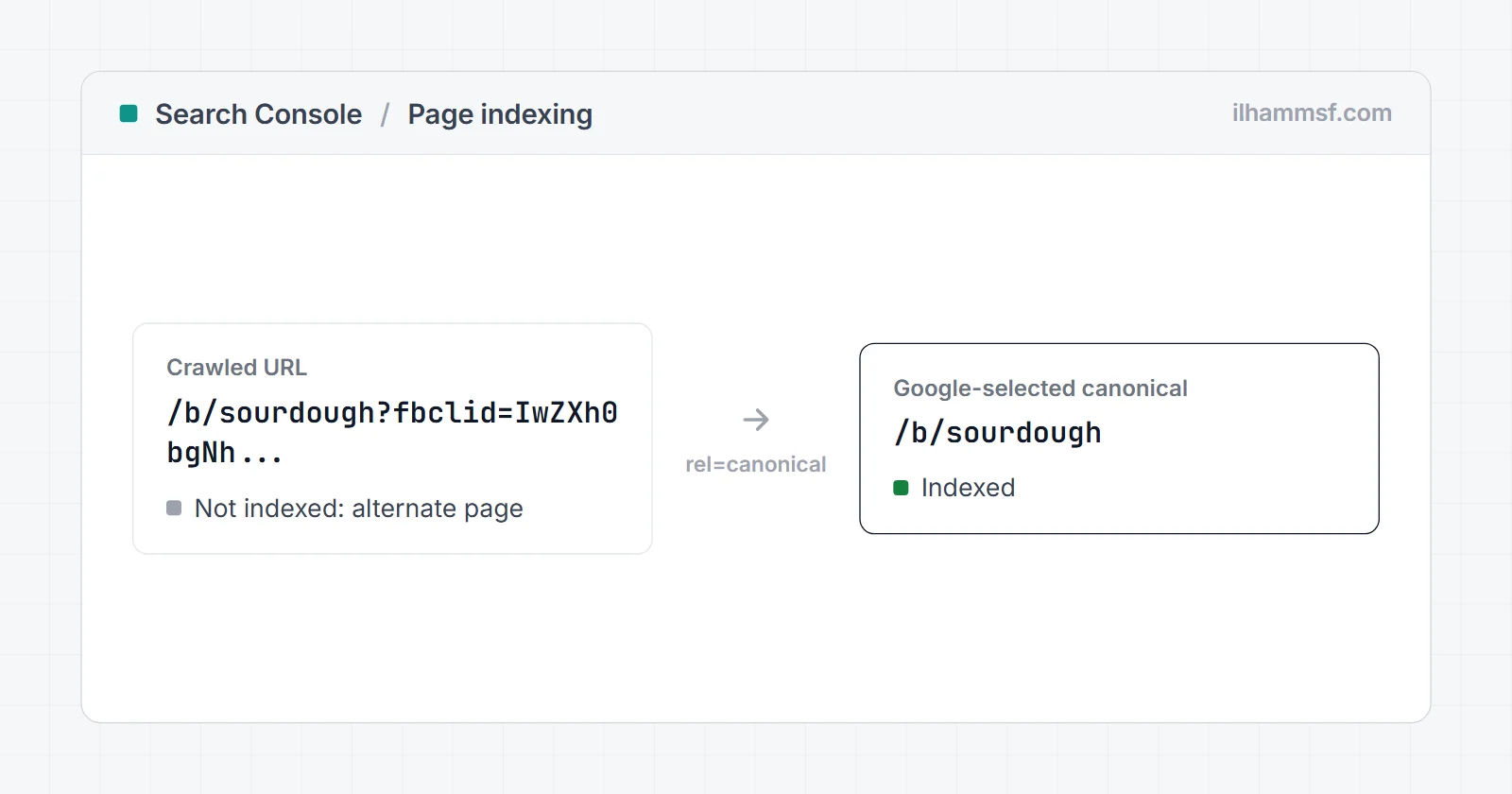
Alternate page with proper canonical tag in Google Search Console usually means everything is working. The URL in the list points to another URL as its canonical (the version you want in Google), Google agreed, and it indexed that other URL instead. The listed URL is not indexed because it is a copy, not because something is broken.
It only becomes a problem when the canonical points to the wrong place, for example when a page you want to rank declares a different page as its canonical. This guide shows how to tell the two apart in a couple of minutes, with real screenshots.
What a canonical tag is, in one paragraph
Many sites serve the same content at more than one address: with tracking parameters (?fbclid=, ?utm_source=), with sorting or filter parameters, in a print version, or as a product variant. A canonical tag is a line in the page head, <link rel="canonical" href="https://example.com/page/">, that tells Google which of those addresses is the main one. Google treats it as a strong hint, not an order, and indexes the URL it picks as canonical.
What the status actually means
Google's Page indexing report help page explains that the page is marked as an alternate of another page, that it correctly points to the canonical page, which is indexed, and that there is nothing you need to do.
So three things are true for every URL in this list:
- The URL declares a canonical that points somewhere else.
- Google accepted that canonical.
- The canonical URL is the one that gets indexed and shown in search.
That is the system working as designed.
A real example: 290 Facebook links
Here is the report from a client site I work on. I blurred the domain, but everything else is as Search Console shows it:
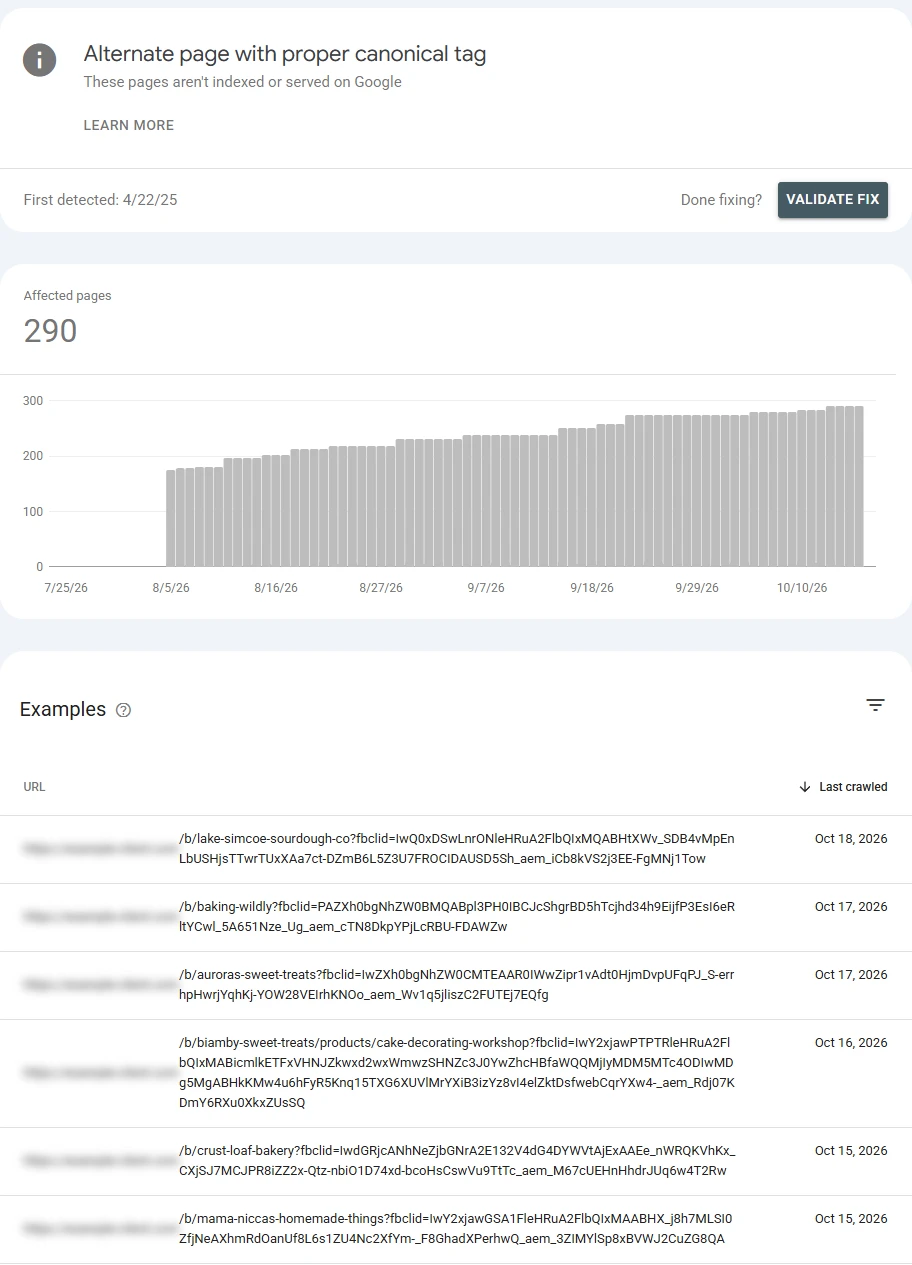
290 URLs, and the count keeps rising. That sounds alarming until you read the examples. Every one of them ends in ?fbclid= followed by a long code. Facebook adds that parameter to links people click on Facebook and Instagram, so each share of a page creates a new address for the same page. Googlebot found those addresses through links on social media, crawled them, saw a canonical pointing to the clean URL without the parameter, and indexed only the clean URL.
The rising count simply follows the number of social shares. It is not a sign of a problem, and there is nothing to fix here.
Step 1: confirm it in URL Inspection
You can check any URL in the list in about 30 seconds. Hover over a row, click the magnifying glass to inspect it, and expand the Page indexing section. The part that matters is at the bottom, under Indexing:
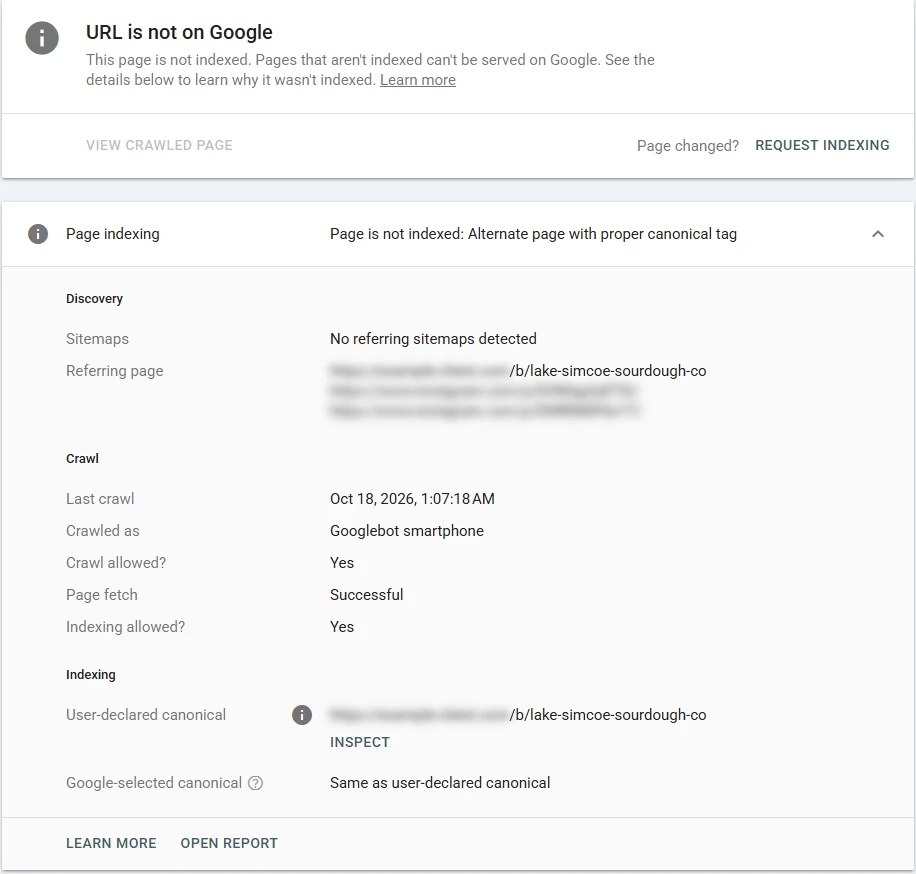
Two lines decide it:
- User-declared canonical: the URL your canonical tag points to. Here it is the clean address without
?fbclid=. - Google-selected canonical: the URL Google chose. Here it says "Same as user-declared canonical".
When those two agree and the declared canonical is the page you want people to land on, you are done. The Discovery section above also tells you where Google found the address. In this case the referring pages were Instagram posts, which confirms the social share explanation.
Step 2: check the canonical yourself with a tool
Search Console only shows URLs Google has already processed. To check a URL before Google does, or to look at many pages quickly, use the indexability checker. It fetches the page like a crawler and reports where the canonical points.
Here it is on a feed URL from my own rental site, tangkaprasa.com:
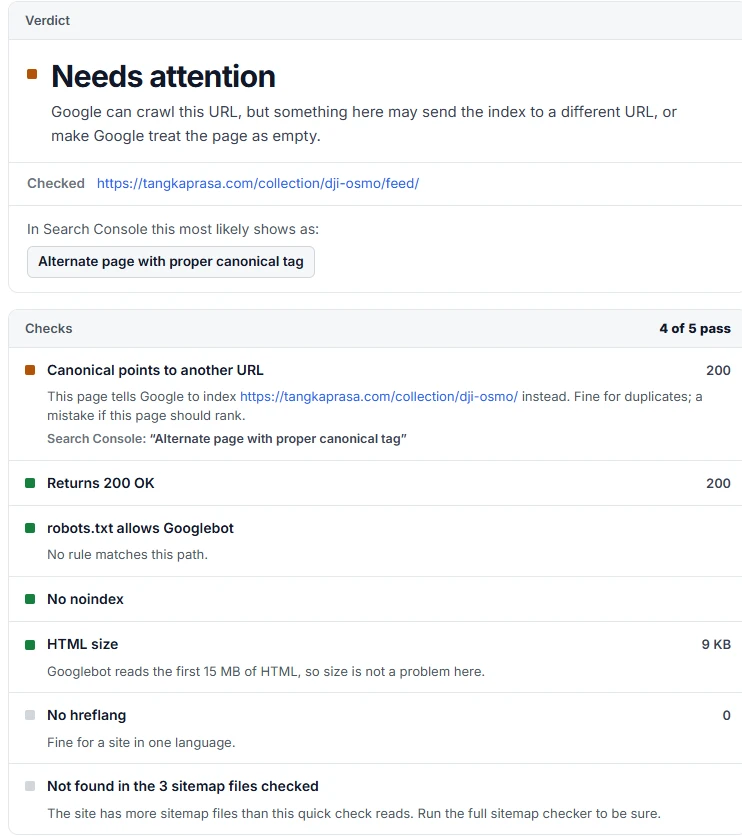
The tool flags it as a warning because a canonical that points away is only correct when the page is a duplicate. For a feed of a collection page, pointing to the collection page is exactly right. For one of your service pages, the same result would mean the page cannot rank.
One honest note on tools: they read the signals on the page, but Google makes the final call. This feed URL shows a canonical to the collection page, yet in my Search Console it is listed as Crawled - currently not indexed, because Google decided a feed is not worth indexing at all before it ever got to the canonical question. If you see that status instead, my guide to crawled - currently not indexed explains it.
When it is a real problem
Open the examples and look for URLs you actually want in Google. If you find one, the canonical on that page points somewhere it should not. The usual causes:
- A template stamps the same canonical on every page, often the homepage. Every other page then declares itself a copy of the homepage.
- Paginated pages point to page 1. Page 2 and 3 of a category list different products, so they are not duplicates. Each should point to itself.
- Product variants you want to rank separately (a different color or size with its own search demand) point to the main product.
- The canonical points to an old domain, http, or a staging site after a migration.
- The canonical target is broken: it redirects, returns a 404, or carries noindex. Google then ignores the hint or indexes something you did not intend.
- The site has two language versions and each language page points its canonical to the other language. Each language version should be its own canonical, connected with hreflang.
The fix in every case: make the page's canonical point to itself (a self-referencing canonical), or to the right main version. Then check that your internal links, sitemap, and redirects all point to that same URL. Mixed signals are what lead Google to pick a different canonical than the one you declared.
Canonical or redirect for tracking parameters?
There are two correct ways to handle parameter URLs, and they show up differently in Search Console.
The client above keeps the ?fbclid= URL working and declares a canonical to the clean URL. Those URLs land in Alternate page with proper canonical tag.
My own site handles it the other way. Here is the same kind of link on tangkaprasa.com:
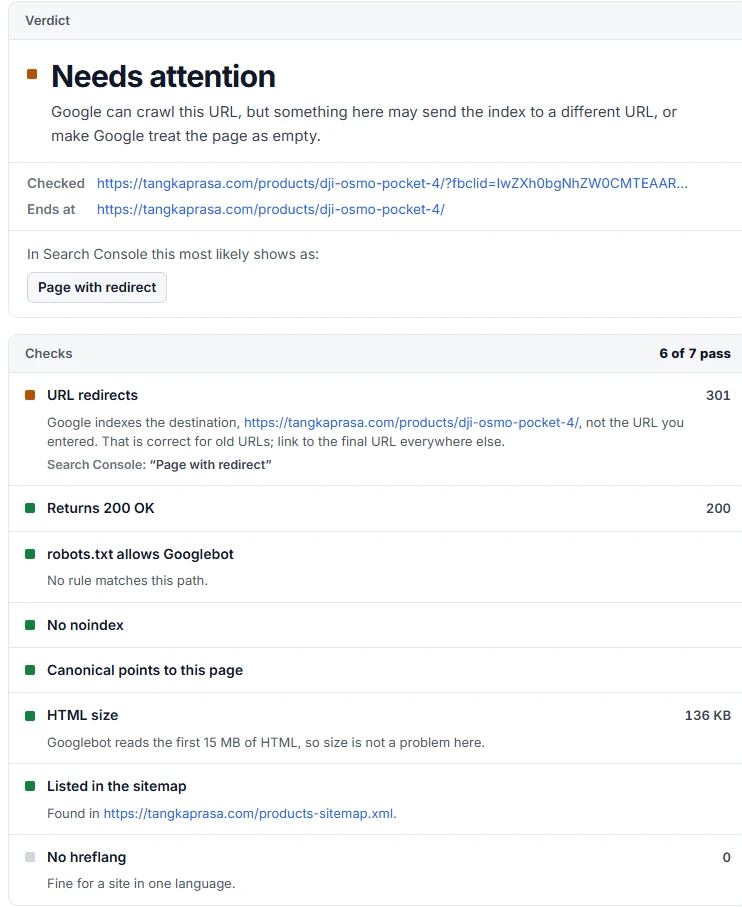
The server answers with a 301 redirect to the clean URL, so the parameter never reaches the page. Those URLs show up in Search Console as Page with redirect instead.
Both are fine for SEO. A canonical is easier to add and leaves the parameter on the landing URL, where the Meta pixel and other tracking scripts can still read it. A redirect that strips the parameter keeps the address bar clean, but the pixel never sees fbclid, so Facebook and Instagram ad clicks can lose their attribution. If you run Meta ads, the canonical approach is the safer choice.
Related statuses that are easy to confuse
| Status in Search Console | What happened | Action |
|---|---|---|
| Alternate page with proper canonical tag | Page points to another canonical, Google agreed | Usually none. Check that the canonical target is right |
| Duplicate without user-selected canonical | Google found duplicates and the page declares no canonical, so Google picked one | Add a canonical tag to the version you want |
| Duplicate, Google chose different canonical than user | Page declares a canonical, Google disagreed and picked another URL | Make your signals agree: links, sitemap, redirects |
| Page with redirect | The URL redirects elsewhere | None if the redirect is intended |
Should you try to reduce the count?
Not for its own sake. The number does not hurt rankings, and on a normal-sized site these URLs do not use up anything you need to manage. What is worth doing:
- Link internally only to the clean, canonical URLs, never to parameter versions.
- Keep parameter URLs out of your sitemap. The sitemap checker shows whether any slipped in.
- Leave the Validate fix button alone for this status. There is nothing to validate.
Frequently asked questions
What does "Alternate page with proper canonical tag" mean?
The page declares another URL as its canonical, Google agreed, and Google indexed that other URL instead. The listed URL is treated as a duplicate.
Is "Alternate page with proper canonical tag" an error?
No. It is listed under pages that are not indexed, but in most cases it is the intended result of a working canonical tag.
Should I fix "Alternate page with proper canonical tag"?
Only if a URL you want to rank is in the list. Then the canonical on that page points to the wrong place and needs to point to itself.
Why do URLs with ?fbclid= or ?utm_source= show up in this report?
Social networks and campaigns add these parameters to links. Google finds the parameter versions through those links, sees the canonical to the clean URL, and indexes only the clean one.
What is the difference between this status and "Duplicate, Google chose different canonical than user"?
Here Google agreed with your canonical. In the other status Google ignored it and chose a different URL, which usually means your signals disagree.
Can I remove these URLs from Search Console?
You do not need to. They are not indexed and are not shown in search results. The report simply lists what Google found.
If your important pages are in this list, or Google keeps choosing a different canonical than yours, a website audit traces where the conflicting signals come from, or you can get in touch and I will take a look.