 By Ilham Musyafa · October 26, 2024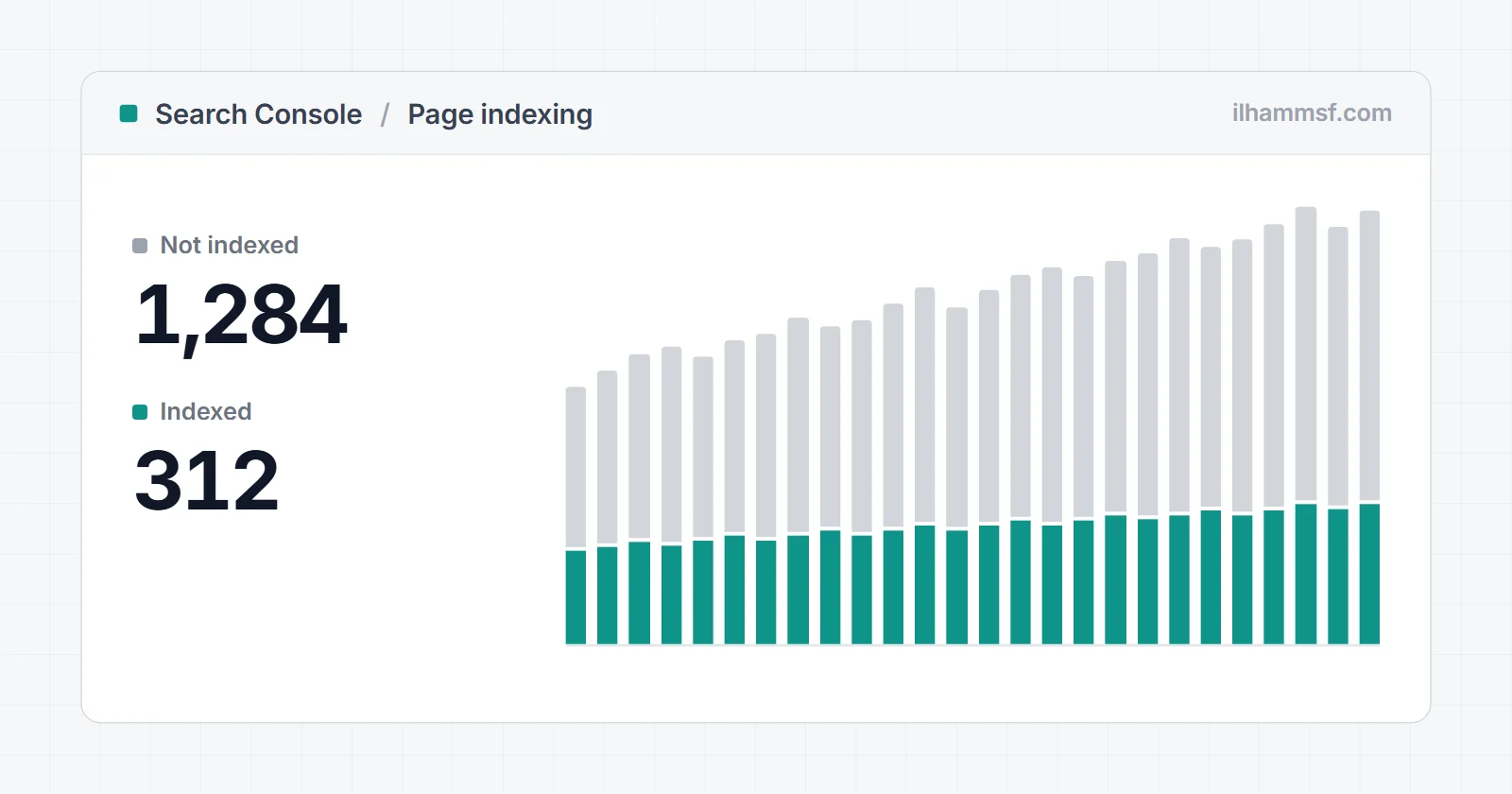
You can write the best article on the internet, but if Google never adds it to its index, it will not rank for a single query. That is why pages not indexed is one of the most important problems in SEO to understand: indexing is the gate everything else depends on. The good news is that Search Console names the reason for you, and most cases come down to five causes: a noindex, a robots.txt block, a canonical pointing elsewhere, a server or access error, or Google deciding the page is not worth indexing yet. This guide shows you how to read the exact label, which labels to ignore, and how to fix the rest in order.
What "page is not indexed" actually means
Google works in stages. It discovers a URL through links or a sitemap, crawls it, renders it like a browser, and then decides whether to index it, meaning store it so it can appear in results. A page can stop at any stage, and the Search Console label tells you which one.
So "page is not indexed" is not one problem. "Discovered - currently not indexed" means Google has the URL but has not crawled it. "Blocked by robots.txt" means it was not allowed to crawl. "Excluded by 'noindex' tag" means it crawled the page and was told to leave it out. "Crawled - currently not indexed" means it crawled the page and chose not to keep it. Each needs a different fix.
A non-indexed page is also not always a mistake. Google's Page indexing report help says many sites have more non-indexed pages than indexed ones, and that this is fine as long as the pages you care about are indexed.
First, confirm it really is not indexed
URL Inspection: "URL is on Google" vs "URL is not on Google"
Paste the full URL into the inspection bar at the top of Search Console. "URL is on Google" means the page is indexed, whatever a site: search shows. "URL is not on Google" comes with a reason, using the same labels as the report. "URL is unknown to Google" means Google has never come across the address, which is a discovery problem.
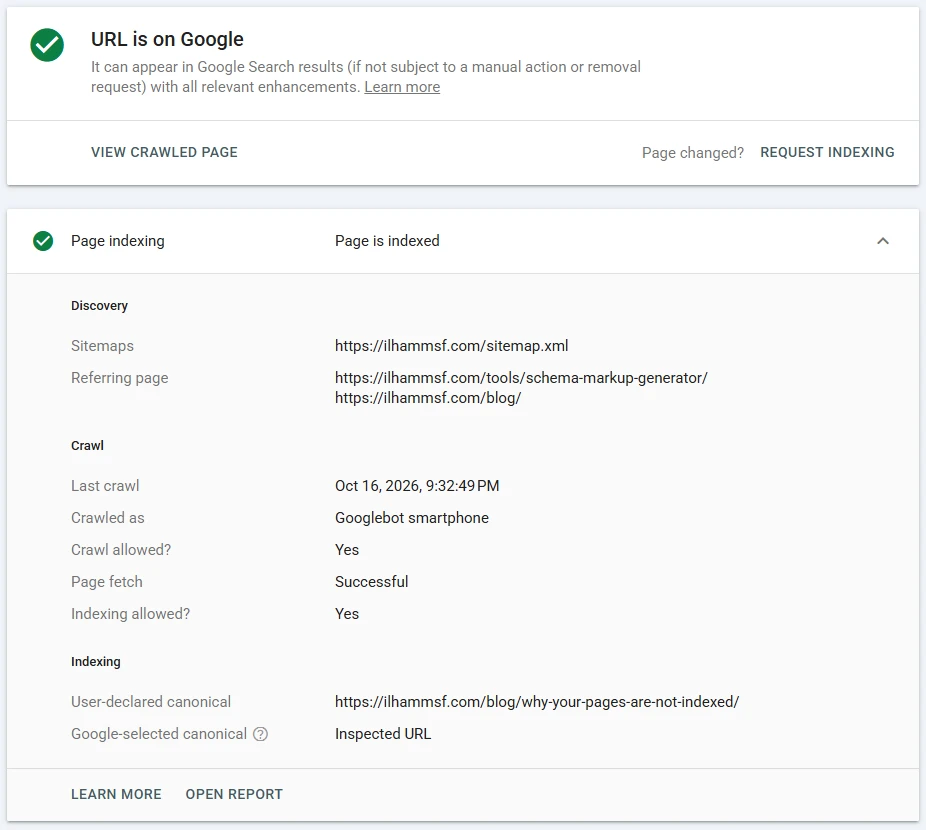
Then click Test live URL. The inspection result is what Google saw on its last crawl; the live test is what it would get now. If you fixed something yesterday, only the live test reflects it.
Why a site: search is not proof
site:example.com/your-page/ samples the index. It can miss pages that are indexed and show pages that are about to drop. Use it to spot patterns across a section, and URL Inspection for a verdict on one page.
Indexed but not ranking is a different problem
If URL Inspection says the page is on Google but you cannot find it for your query, it is indexed and not ranking. That is a relevance, competition or keyword cannibalization question. And if you published hours ago, the report itself can lag, which I cover in why Google Search Console is not updating.
How to find the exact reason in Search Console
- Open Search Console and choose the property.
- Go to Indexing, then Pages.
- Scroll to Why pages aren't indexed. Each row is one reason with a URL count.
- Click a reason to see example URLs and its trend.
- Inspect one of the example URLs.
- Run Test live URL to confirm the problem still exists today.
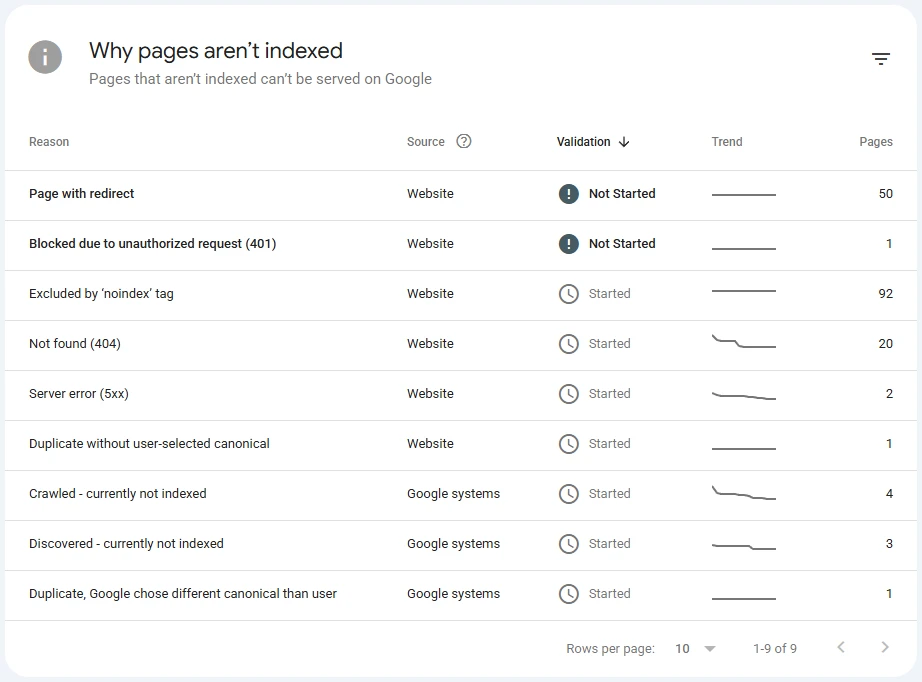
Look at the Source column too. "Website" means something on your site caused it, such as a tag, a status code or a rule. "Google systems" means Google made the call, as with "Crawled - currently not indexed".
Every "not indexed" reason, mapped to a fix
This is the map I use. "Expected" means the row is often correct and only needs action if a page you want indexed is in it.
| Label in Search Console | Stage | Problem or expected | First check | Fix |
|---|---|---|---|---|
| Server error (5xx) | Crawl | Problem | Server logs at crawl time | Fix uptime and timeouts |
| Redirect error | Crawl | Problem | Follow the chain by hand | Remove loops, shorten chains |
| Blocked by robots.txt | Crawl | Depends | Test the path | Remove the Disallow rule |
| Excluded by 'noindex' tag | Index | Depends | Meta tag and X-Robots-Tag | Remove noindex if it should rank |
| Soft 404 | Index | Problem | Does the page look empty? | Add content or return 404 |
| Blocked due to unauthorized request (401) | Crawl | Depends | Login wall | Make public or leave it |
| Not found (404) | Crawl | Usually expected | Was it deleted? | 301 if moved, else ignore |
| Blocked due to access forbidden (403) | Crawl | Problem | Firewall, security plugin | Allow verified Googlebot |
| Blocked due to other 4xx issue | Crawl | Problem | Exact status code | Return 200 for real pages |
| Crawled - currently not indexed | Index | Problem if it matters | Quality, duplication | Improve, merge, link it |
| Discovered - currently not indexed | Crawl | Problem if it lasts | Server speed, links | Faster server, more links |
| Alternate page with proper canonical tag | Index | Expected | Canonical target is right | Nothing |
| Duplicate without user-selected canonical | Index | Depends | Is there a canonical? | Add one |
| Duplicate, Google chose different canonical than user | Index | Depends | Which URL Google picked | Align canonical, links, sitemap |
| Page with redirect | Crawl | Expected | Is the redirect intended? | Nothing, update links |
| URL is unknown to Google (Inspection) | Discover | Problem | Sitemap, internal links | Link it, list it |
The report shows what Google saw on its last crawl, which can be weeks old. To see what a crawler gets today, I paste the URL into the indexability checker. It follows redirects, reads robots.txt, looks for noindex in both the HTML and the response headers, checks the canonical, and prints the matching Search Console label next to anything that fails.
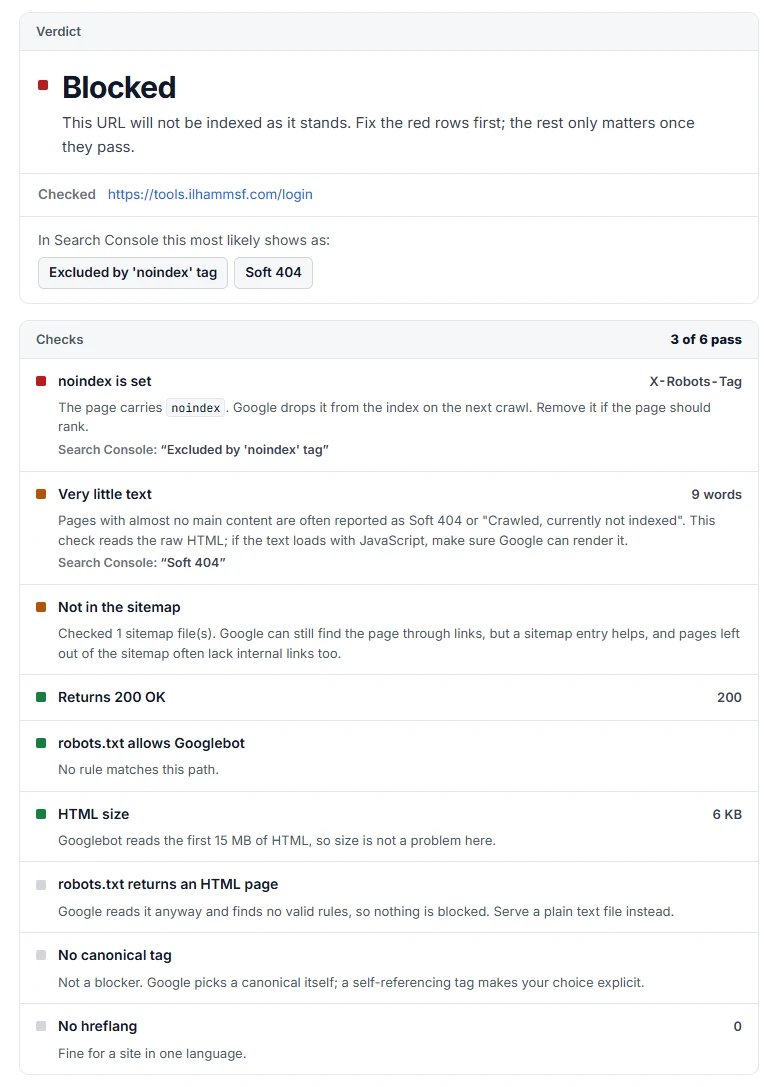
That is my own tools gateway, which sits behind a login and should never be indexed. The noindex comes from a response header set by the server, not a tag in the HTML. That is exactly the case where someone searches the page source, finds nothing, and decides Search Console is wrong.
The blocks you set yourself
noindex in the meta tag or the X-Robots-Tag header
A noindex can live in the HTML as <meta name="robots" content="noindex"> or in an HTTP header as X-Robots-Tag: noindex. Search Console shows both as "Excluded by 'noindex' tag" (the help docs call it "URL marked 'noindex'"). It belongs on thank-you pages, internal search results, staging copies and login pages, but it often survives a redesign, gets copied from a template, or is set by an SEO plugin for a whole post type. Check the source and the response headers, remove it if the page should be public, then request indexing.
robots.txt Disallow, and why robots.txt plus noindex backfires
Rules in robots.txt match by prefix. Disallow: /blog blocks /blog/, every post under it, and /blog-news/ too. To check, paste your robots.txt into the robots.txt tester and test the exact path. It shows whether Googlebot is allowed, which group applied, and the line that decided it.
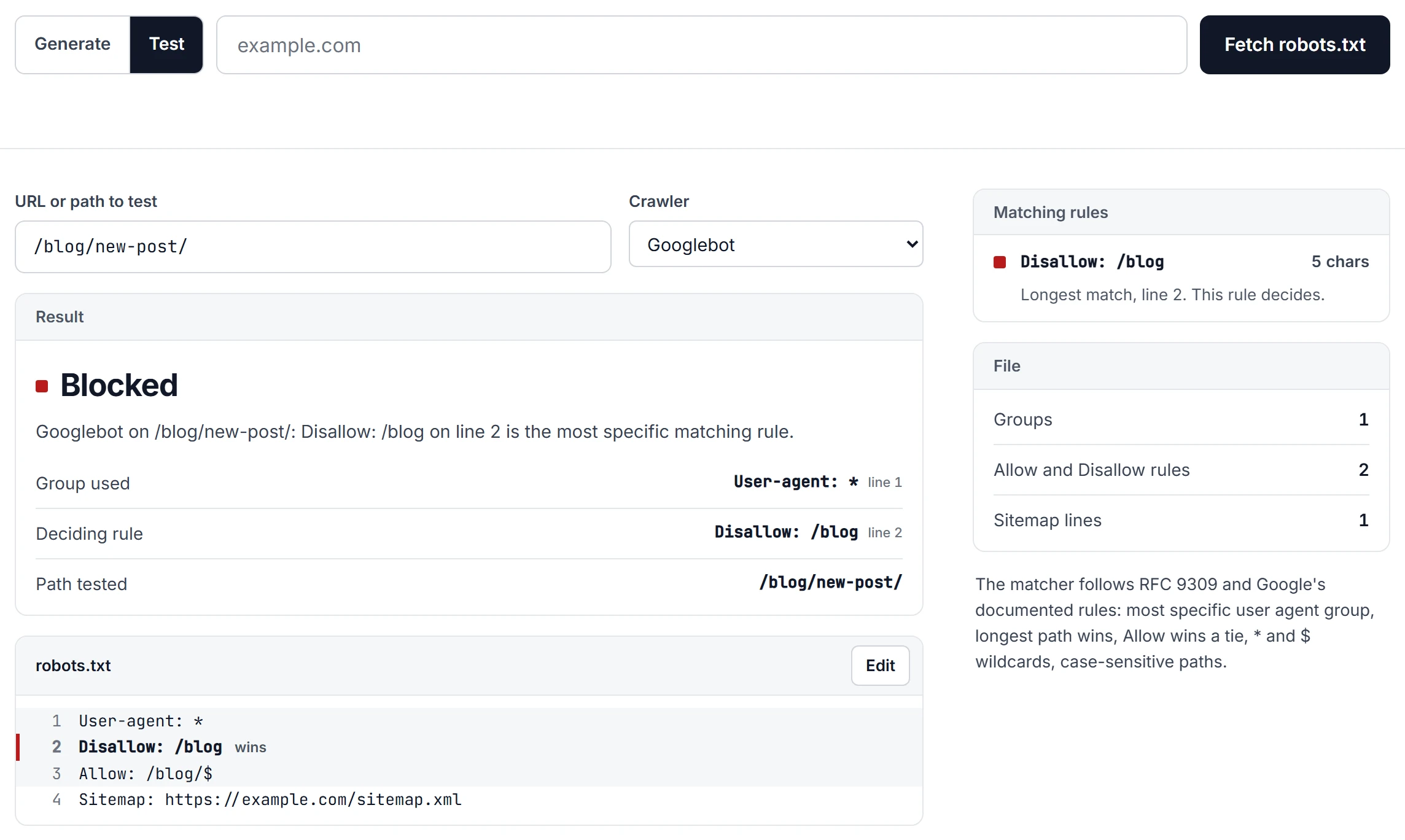
Two subtleties catch people. robots.txt blocks crawling, not indexing: a blocked URL with links pointing to it can still be indexed unread, which shows as "Indexed, though blocked by robots.txt". And if you want a page out of the index, do not block it and noindex it at the same time. Google cannot crawl it, so it never sees the noindex.
Canonical pointing somewhere else
If a page's canonical names a different URL, Google usually indexes that one instead. For real duplicates that is correct and shows as "Alternate page with proper canonical tag", which I cover in its own guide to alternate page with proper canonical tag. It is a mistake when a template stamps the homepage as the canonical on every page, or a migration left canonicals on the old domain. For "Duplicate, Google chose different canonical than user", make your signals agree: internal links, sitemap, redirects and hreflang should all point at the URL you declared.
Redirects and redirect chains
"Page with redirect" is fine: the destination is what gets indexed. "Redirect error" means a loop, a chain too long to follow, or a redirect to a bad URL. Cut it to a single hop and point internal links and the sitemap at the final URL.
Server and access problems
5xx and timeouts
"Server error (5xx)" means your server failed or did not answer in time when Google asked. Check your host's error logs for the crawl dates, then run Test live URL. If errors repeat, fix the hosting first; Google also slows its crawling of a site that keeps erroring.
401 and 403 from security plugins, WAF or Cloudflare rules
A 401 means a login is required; a 403 means the server refused. On public pages the cause is usually a security layer: a WordPress security plugin, a WAF rule, hosting DDoS protection, or a Cloudflare bot setting. You never notice because you are a normal browser with cookies. Check the firewall logs and allow verified Googlebot rather than switching protection off.
Soft 404
A soft 404 returns status 200 but looks empty or like an error to Google: a product with no content, an empty category, a search page with zero results. Give it real content or return a proper 404 or 410.
JavaScript content Google cannot render
If your content only appears after JavaScript runs, content loaded on click or scroll, API calls that fail for crawlers, or blocked scripts can leave Google looking at an empty shell. In URL Inspection, open View crawled page and check the HTML and screenshot. If your main text is missing there, Google is not indexing it. Server-side rendering or plain HTML removes the problem, one reason I build sites by hand.
Crawled vs Discovered - currently not indexed
These two sound alike, but Google's definitions are very different:
| Crawled - currently not indexed | Discovered - currently not indexed | |
|---|---|---|
| Fetched by Google? | Yes | No |
| Google's explanation | Crawled, may be indexed later | Crawl rescheduled to avoid overloading the site |
| Last crawl date | Present | Empty |
| Usual cause | Quality, duplication | Server capacity, weak links |
| Resubmit? | Google says no need | Only after fixing the cause |
| What to do | Improve or merge, add links | Faster server, better links |
Crawled - currently not indexed is a judgement. Google read the page and decided it does not add enough right now. Thin pages, near-duplicates and auto-generated pages land here. Give the page something the similar pages do not have, merge thin pages into one stronger page, and link to it from indexed pages. This is also why "Validate fix" often fails here: if the content did not meaningfully change, Google's answer will not either. The full walkthrough, with a real example, is in my guide to crawled - currently not indexed.
Discovered - currently not indexed is a scheduling problem. On a small site it usually clears within days or weeks. On a large or slow site it piles up. A faster server, fewer junk URLs (filters, parameters, tag pages) competing for crawl time, and strong internal links to the pages that matter are what move it.
Quality, duplication and "not yet"
Too new. Put the page in your sitemap, link to it from an indexed page, and request indexing once in URL Inspection. The request has a daily limit, and repeating it does nothing extra.
Orphaned. A page with no internal links can sit unfound for a long time. Link important pages from relevant indexed pages with descriptive anchor text.
Missing from the sitemap. If a new post shows "URL is unknown to Google", run your sitemap through the sitemap checker and look at the URL count and sampled statuses. A sitemap listing http or redirected addresses sends Google to the wrong place. If the Sitemaps report shows an error, see my guide to the sitemap temporary processing error.
Duplicated by URL variants. Parameters (?sort=, ?utm_source=), print versions, and http/https or www/non-www variants compete with the real page. Pick one, redirect or canonicalise the rest, and link only to it.
Which "not indexed" rows you can safely ignore
- Page with redirect: old URLs that now redirect.
- Alternate page with proper canonical tag: duplicates pointing at the right version.
- Not found (404) for pages you deleted or that never should have existed.
- Excluded by 'noindex' tag on pages noindexed on purpose: login, cart, search results.
- Blocked due to unauthorized request (401) on private areas.
My own site shows how scary a healthy report can look. ilhammsf.com used to run on WordPress, and that install was hit by a spam injection that created thousands of junk URLs ending in .htm. Since the move to a hand-coded build in July 2026, the server answers those addresses with 410 Gone, and old category and tag archives redirect to the blog. Search Console still lists the spam under "Not found (404)", where 410 responses are reported too, and under "Crawled - currently not indexed", with the archives under "Page with redirect". None of it needs fixing. The real pages are indexed, and the junk ages out as Google recrawls.
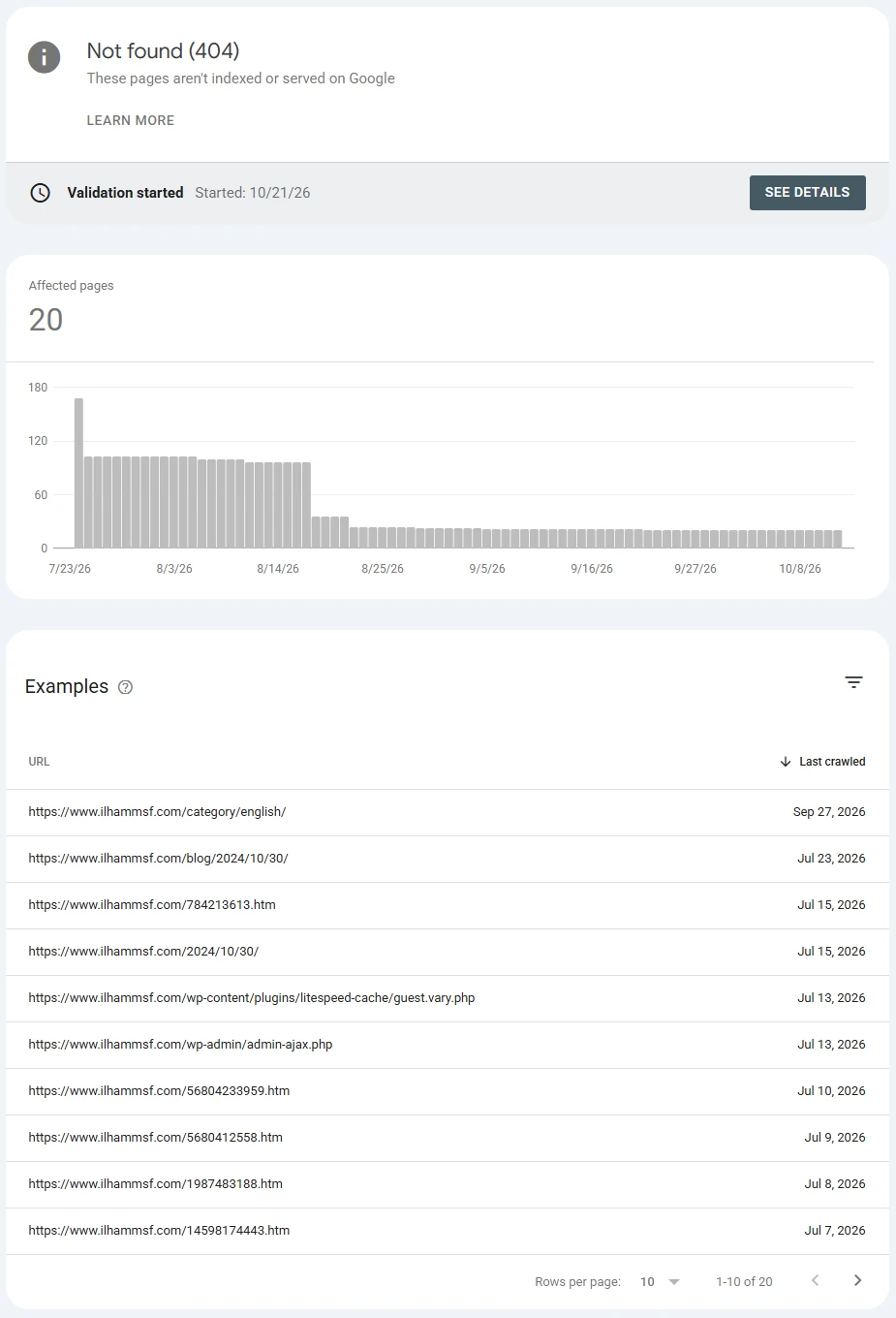
The rule: only act on a row if a URL you want in Google is inside it.
Platform gotchas
WordPress
Check Settings, Reading first. If "Discourage search engines from indexing this site" is ticked, every page gets a noindex, and it is often left on after a launch or staging push. Then check Yoast or Rank Math for noindexed post types, taxonomies or single posts, security plugins for 403s, and caching plugins serving stale noindexed pages after a fix.
Shopify
Products are reachable through paths like /collections/name/products/item, canonicalised to /products/item, so many "Alternate page with proper canonical tag" rows are normal. Make sure you are in the property for your primary domain, not myshopify.com.
Static hosts like GitHub Pages
Single-page apps often use a 404.html trick for client-side routes. The page displays fine, but the status is 404, so Google reports "Not found (404)". Generate a real HTML file per route, or use a host with rewrites.
After the fix: Request indexing, Validate fix, and how long to wait
For one important page, run Test live URL and click Request indexing. That queues a crawl; it does not guarantee indexing.
For a whole reason, open it in the report and click Validate fix. Search Console recrawls the affected URLs and shows the state:
- Started: running, nothing passed or failed yet.
- Looking good: URLs checked so far no longer have the issue.
- Passed: all checked URLs are clear.
- Failed: at least one URL still has it. Fix and validate again.
Google says validation can take around two weeks, sometimes longer. It is only tracking; Google recrawls your pages either way.
Rare but serious: manual actions and mobile-first indexing
Manual actions. If Google's reviewers found spam such as unnatural links or cloaking, pages can be removed. Check Security and Manual Actions in Search Console, fix what it describes, and submit a reconsideration request. This is uncommon, so rule out the everyday causes first.
Mobile-first indexing. Google crawls most sites with its smartphone crawler, so the mobile version is the one it indexes. Content, links or structured data that exist only on desktop are missing for indexing purposes.
The order to work in
- Inspect the URL and read the exact reason.
- Run Test live URL to confirm the problem exists today.
- Clear self-inflicted blocks: noindex (tag and header), robots.txt, canonical, redirects.
- Fix server and access errors: 5xx, 401, 403, soft 404s.
- Check the page renders with its main content visible.
- Strengthen discovery and quality: sitemap, internal links, merged pages.
- Request indexing or validate, then leave it for a week or two.
Most non-indexed pages are explained in the first three steps.
Frequently asked questions
What does "page is not indexed" mean in Google Search Console?
Google knows the URL but has not stored it in its index, so it cannot appear in results. The label next to it tells you why: blocked, excluded on purpose, an error, or a choice Google made. Some, like redirects and deleted pages, are expected.
How do I check which pages are indexed by Google?
For a whole site, open Indexing, then Pages, and use "View data about indexed pages" for the list. For one page, use URL Inspection: "URL is on Google" means indexed. A site: search is only a rough sample.
What is the difference between "Crawled - currently not indexed" and "Discovered - currently not indexed"?
Crawled means Google fetched the page and chose not to index it, usually for quality or duplication. Discovered means Google knows the URL but has not fetched it, usually because of crawl scheduling or weak internal links. The first needs a better page, the second a faster server and better links.
How long does it take Google to index a new page?
There is no fixed time. On a site Google crawls often, a well-linked page can be indexed within a day or two; on a new or slow site it can take weeks. A sitemap entry, internal links and one indexing request all help.
Why does validation fail for "Crawled - currently not indexed"?
Validation only checks whether the URLs are still not indexed. If the pages did not meaningfully improve, Google makes the same decision on recrawl. Improve, merge or better link them before validating again.
Should I worry about "Page with redirect" in the not indexed list?
Usually not. A redirecting URL is never indexed itself; its destination is. Act only if a page you want indexed redirects by mistake.
How do I remove not indexed pages from Google Search Console?
You cannot delete rows from the report. Fix the pages you want indexed and leave the rest; URLs that keep returning 404 or 410 drop out over time. The Removals tool hides pages from search results, it does not clean up the report.
Why are my WordPress pages not indexed by Google?
Check Settings, Reading and make sure "Discourage search engines from indexing this site" is off. Then check your SEO plugin's noindex settings, and whether a security or caching plugin is blocking Google or serving stale pages.
If a batch of important pages refuses to index and you cannot find why, a website audit will trace it to the root cause, or you can explore my SEO services if you would like the whole thing handled for you.