 By Ilham Musyafa · November 10, 2026
To see what keywords a website ranks for, the method depends on whose website it is. For your own site, Google Search Console shows the exact searches that brought people to you, with real clicks and positions. For a competitor's site, you need a keyword research tool such as Ahrefs, Semrush or Ubersuggest, which tracks millions of keywords and records which pages rank for them.
This guide covers both, plus how to check the rank of one specific keyword by hand without getting a misleading result, and how to keep tracking keyword rankings over time.
Your site or someone else's
| What you want | Best source | Cost |
|---|---|---|
| Every query your own site appears for | Google Search Console | Free |
| Keywords your own site ranks for, with search volume | Ahrefs Webmaster Tools (verified site) | Free |
| Keywords a competitor ranks for | Ahrefs Site Explorer, Semrush Organic Research | Paid, with limited free lookups |
| The position of one keyword, right now | A clean manual Google search | Free |
| Daily position history for a list of keywords | A rank tracker | Usually paid |
How to see the keywords your own site ranks for
Google Search Console
Search Console is the only source that shows real Google queries for your site. Every other tool is guessing from its own keyword database.
- Open Google Search Console and pick your property.
- Go to Performance > Search results.
- Turn on Average position next to clicks and impressions.
- Scroll to the Queries tab. Each row is a search that showed your site, with its clicks, impressions and average position.
- Set the date range to the last 3 months for a stable picture.
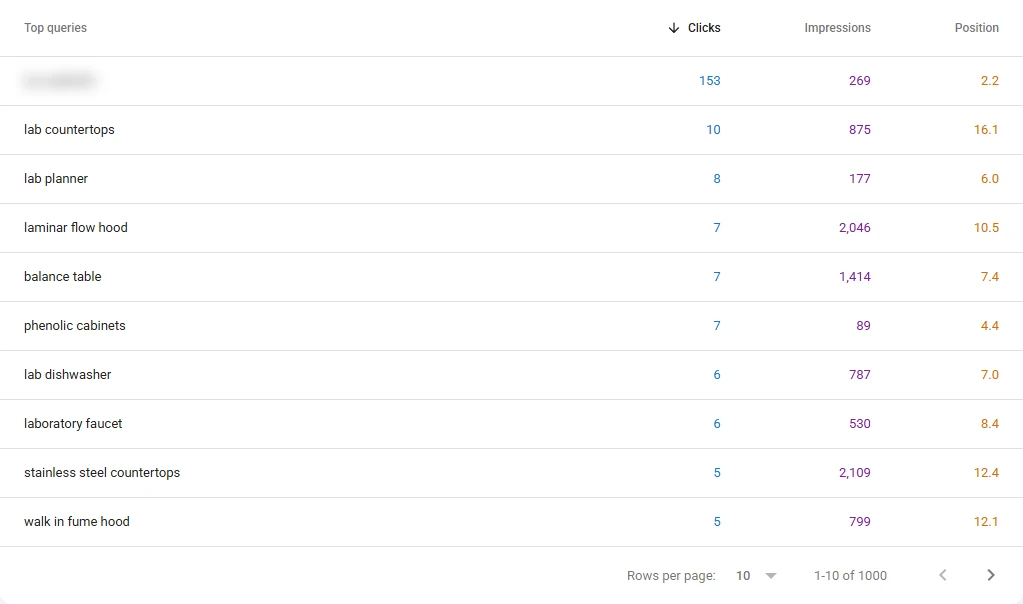
This is a client site I manage (lab furniture, domain and brand hidden). The top row is the brand name. Everything below it is the real non-branded demand.
Useful filters:
- One page's keywords: click + Add filter > Page, paste the URL. The Queries tab now shows only the keywords that page ranks for.
- Keywords close to page one: sort by Position and look at queries between 8 and 20 with decent impressions. These are the cheapest wins, because a small improvement moves them onto page one. In the screenshot above, laminar flow hood (2,046 impressions, position 10.5) and stainless steel countertops (2,109 impressions, position 12.4) are exactly that kind of keyword: plenty of searches, sitting just off page one.
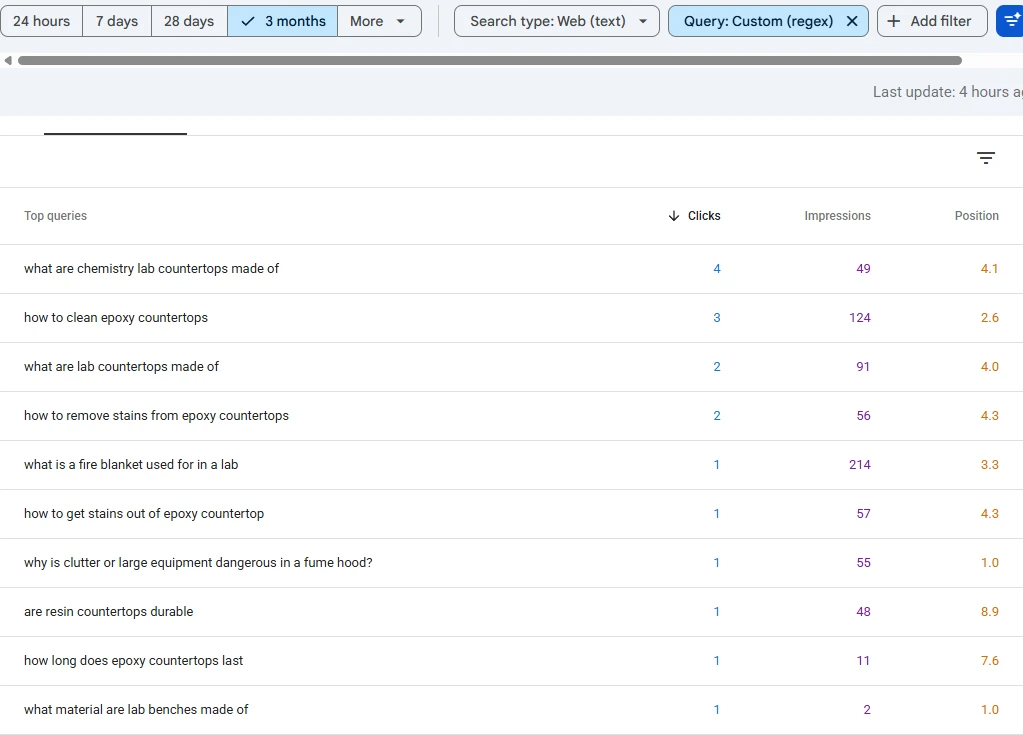
- Questions people ask: filter Query with a custom regex such as
^(how|what|why|can|does|which|where|is|are)to find question keywords worth a FAQ answer or a new article.
Two limits to know. Search Console hides very rare queries to protect privacy, so the query list never adds up to your total clicks. And "Average position" is an average across every search, device and location, so a keyword showing position 7.4 may be at 3 for some people and 15 for others.
Ahrefs Webmaster Tools
If you want search volume and keyword difficulty next to your own rankings, Ahrefs Webmaster Tools is free once you verify your site (you can import the verification from Search Console). It shows your organic keywords in the same format as a paid Site Explorer report, but only for sites you own.
How to see what keywords a competitor ranks for
For a site you do not own, you need a tool with its own keyword database. These tools crawl search results for millions of keywords and store which URL ranks where.
Ahrefs Site Explorer
- Open Site Explorer and enter the competitor's domain.
- Click Organic keywords in the left menu.
- Pick the country you care about.
- Sort by Traffic to see the keywords that bring them the most visits, or by Volume to see the biggest searches they rank for.
- Add a filter for Position 1 to 10 to see only page-one rankings.
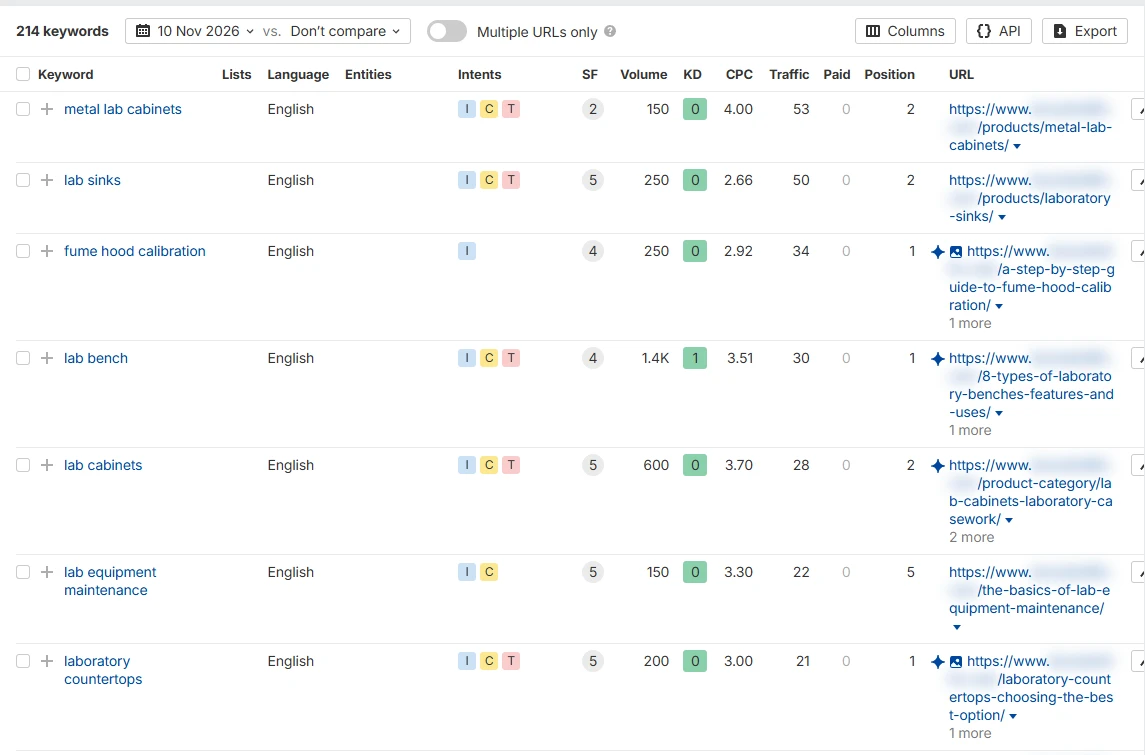
Compare this with the Search Console screenshot above for the same site. Ahrefs lists 214 keywords for the US. Search Console lists 1,000 queries for that site (the table stops counting at 1,000), because it sees every real search, not only the keywords in a tool's database. That gap is normal, and it is why the tool view is for competitors and Search Console is for your own site.
Run the same report on the competitor's top pages (Top pages, then click the keyword count of a page) to see which keywords each page wins.
Semrush Organic Research
In Semrush, go to Organic Research, enter the domain and open the Positions tab. It works the same way: keyword, position, volume, URL. A free account gives a small number of lookups per day, enough for a quick check of one or two competitors.
Free options
Ubersuggest shows a limited list of a domain's top keywords for free, a few searches per day. It is fine for a first look. For anything you plan to act on, check the important keywords in a second tool, because each database covers a different set of keywords.
Turn a competitor's keywords into a plan
A raw list of a competitor's keywords is not a plan yet. Three filters make it useful:
- Keywords they rank for and you do not. In Ahrefs this is the Content gap report. These are topics your site is missing.
- Low difficulty, real volume. A keyword with KD 0 to 10 and a few hundred searches is a realistic target for a small site.
- Same intent as your offer. A keyword only helps if the person searching could become your customer. The guide to types of keywords explains how to tell intent apart.
Once you have the list, group the keywords so one page targets one intent. Two of your own pages chasing the same keyword will split the ranking, which is keyword cannibalization.
How to check the rank of one keyword manually
Searching the keyword on your own phone is the most common way people check, and the least reliable. Google personalises results by location, language, device and your search history. To get a cleaner check:
- Open a private or incognito window.
- Search the keyword and add
&gl=us&hl=ento the end of the results URL to set the country and language, or the country code you need (for Indonesia,&gl=id&hl=id). - Remember that a local keyword such as "camera rental jogja" still depends on where you are physically. Results in Jakarta and Jogja will differ.
- Count organic results only. Ads, the map pack and "People also ask" boxes are not organic positions.
For anything more than a handful of keywords, use Search Console or a rank tracker instead. Manual checks do not scale and they only show one moment in time.
How to track keyword rankings over time
Why track keywords at all? Because rankings move after Google updates, after you change a page, and after a competitor publishes something better. Tracking tells you which of those happened, early enough to react.
- Free: export the Queries table from Search Console once a month and keep the files. Comparing the same date range month to month is a basic rank tracker that costs nothing. Note the dates of Google algorithm updates next to any big movement.
- Paid: rank trackers in Ahrefs, Semrush or standalone tools check a fixed list of keywords every day or every week, from a set location, and chart the history.
Track 20 to 50 keywords that matter for your business, not hundreds. A short list you actually look at beats a long one you never open.
Frequently asked questions
How can I see what keywords a website ranks for for free?
For your own site, Google Search Console shows every query free of charge, and Ahrefs Webmaster Tools adds volume and difficulty for verified sites. For a competitor, free accounts on Ahrefs, Semrush or Ubersuggest give a limited number of lookups per day.
How do I check keyword ranking for my website on Google?
Open Search Console, go to Performance > Search results, turn on Average position and read the Queries tab. Filter by page to see the keywords for one URL.
Why does Search Console show a different position than my manual search?
Search Console reports an average across every search, location and device over the date range. Your manual search is one result, in one place, at one moment, often personalised to you.
Can I see the exact keywords a competitor gets traffic from?
Only approximately. Tools show the keywords they track and estimate traffic from them. The competitor's real queries are visible only in their own Search Console.
How many keywords should I track?
Start with 20 to 50 that are close to what you sell or offer. Add more only when you have a page targeting them.
Is there a tool to find keyword ideas for a new page?
Yes. The free keyword generator turns one seed keyword into a list of related searches. For a full competitor-based keyword plan, see the keyword research service.