 By Ilham Musyafa · November 10, 2026
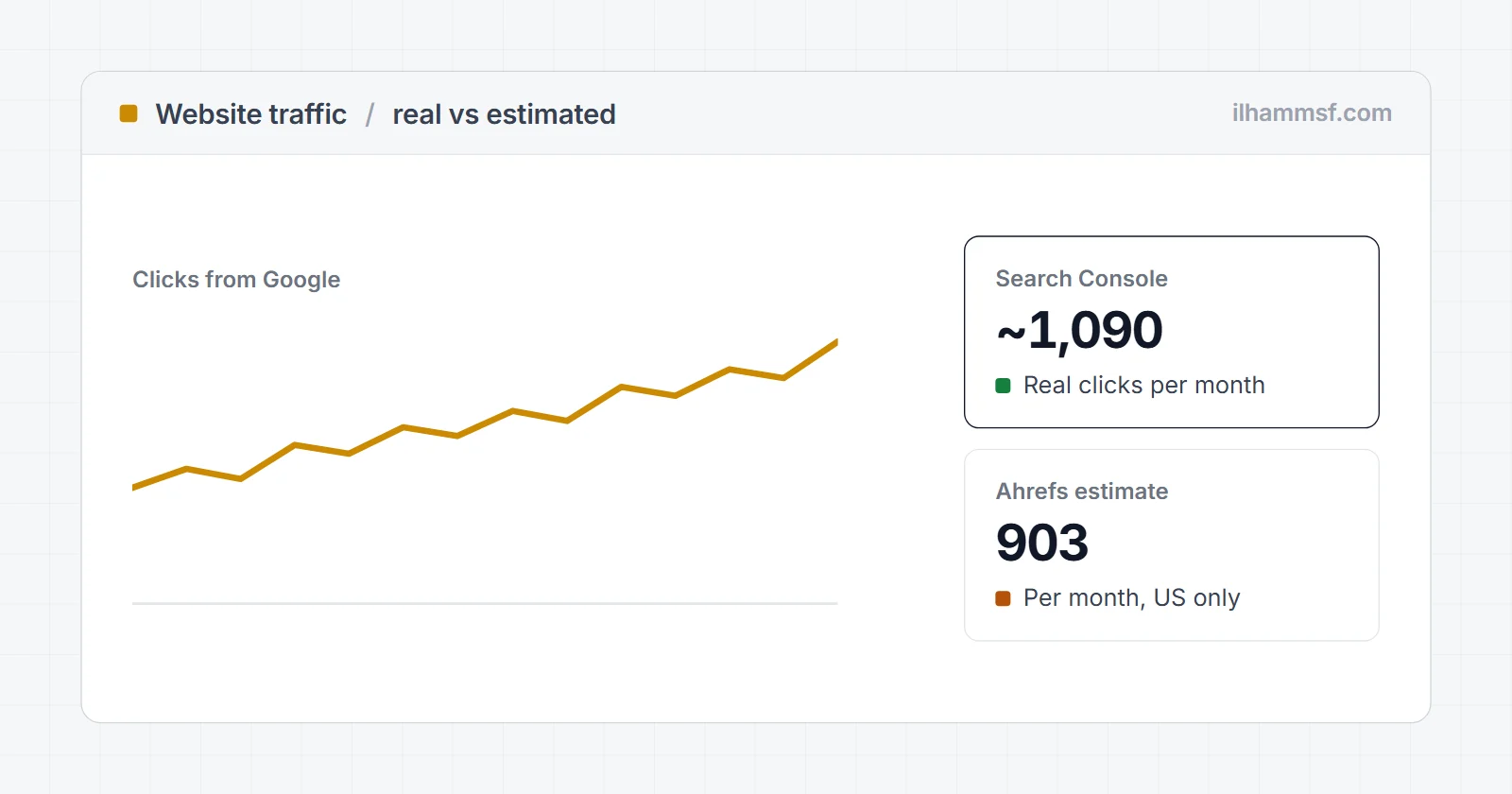
There are two very different questions hiding behind "how do I check website traffic". If the site is yours, you can see the real numbers, down to the visitor, in Google Analytics 4 and Google Search Console. If the site belongs to someone else, nobody outside that company has the real numbers, so every traffic checker you use is giving you an estimate.
Both are useful. You just have to know which one you are looking at, because an estimate that is off by 50% is normal, and making decisions as if it were exact is where people get burned.
This guide covers both: where to find the real traffic data for your own website, how free and paid website traffic checkers estimate a competitor's visits, and a simple way to calculate the traffic a site could get from a list of keywords.
Your own site or someone else's
| You want to know | Where the number comes from | How accurate |
|---|---|---|
| Visitors to your own site, from every source | Google Analytics 4 (or another analytics script) | Close to real, minus visitors who block tracking |
| Visitors from Google search to your own site | Google Search Console | Real clicks from Google, straight from Google |
| Organic traffic of a competitor | Ahrefs, Semrush, Similarweb, Ubersuggest | Estimate, often off by 30 to 70% |
| Total traffic of a big competitor site | Similarweb | Estimate, better for large sites than small ones |
If you only remember one thing: for your own site, never use a third-party traffic checker as your main number. You already own better data.
How to check traffic on your own website
Google Analytics 4: all visitors, every source
GA4 counts every visit where its tracking code loads, whether the person came from Google, Instagram, a WhatsApp link or typed the address directly.
- Open Google Analytics and pick your property.
- Go to Reports > Acquisition > Traffic acquisition.
- Set the date range at the top right. The table shows Sessions and Users per channel: Organic Search, Direct, Referral, Organic Social and so on.
- For daily visitors on your website, look at the line chart above the table. Hover any point to see that day's users.
- For right-now numbers, open Reports > Realtime, which shows active users in the last 30 minutes.
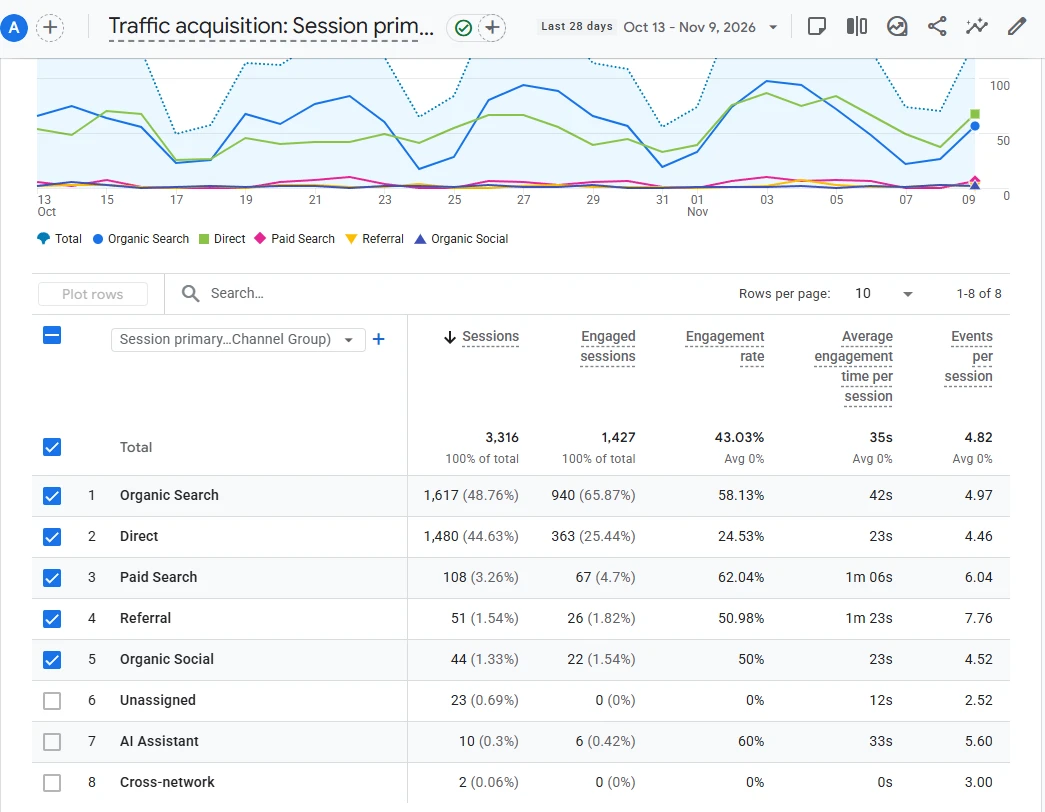
This is a real client site I work on, with the domain blurred. Organic Search and Direct bring almost all of the sessions, so those are the two channels worth watching week to week.
Two things to keep in mind. GA4 cannot count visitors who block analytics scripts or reject cookies on a consent banner, so the real number is a bit higher. And if you share links in campaigns, tag them with UTM parameters so they show up as their own source instead of "Direct". The free UTM builder makes those links for you.
Google Search Console: organic traffic from Google
Search Console shows how many clicks your site got from Google Search, and for which queries and pages. It is the most honest organic traffic checker you can have, because the numbers come from Google itself.
- Open Google Search Console and choose your property.
- Click Performance > Search results.
- Turn on Total clicks and Total impressions. The graph is your website traffic graph from Google, day by day.
- Use the Queries and Pages tabs below the graph to see what people searched and which pages they landed on.
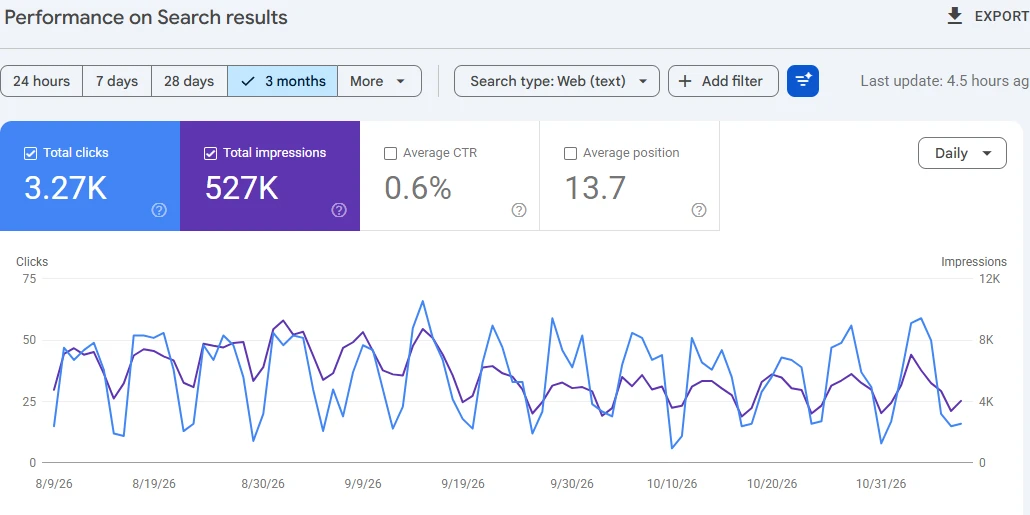
Search Console keeps 16 months of data and usually runs two to three days behind. If the report looks stuck, that is often normal. This guide on Search Console not updating explains when a delay is a real problem.
GA4 and Search Console will not match
Search Console counts clicks. GA4 counts sessions where the tracking script ran. A click that bounces before the page loads, a visitor with an ad blocker, or two clicks within one session all make the numbers drift apart. A gap of 10 to 20% is ordinary. Use Search Console for "how is Google sending me traffic" and GA4 for "what do visitors do once they arrive".
Hosting stats and server logs
cPanel tools such as AWStats, or your server's access logs, also count visits. They include bots, crawlers and uptime monitors, so the numbers are usually much higher than GA4. They are useful for spotting crawl problems, not for reporting real visitors.
How to check website traffic of any competitor
For a site you do not own, there is no exact number available to you. Traffic checkers build an estimate in one of two ways:
- From rankings. Tools like Ahrefs, Semrush and Ubersuggest know which keywords a site ranks for, the search volume of each keyword, and the position. They multiply search volume by an expected click-through rate for that position and add it up. This only covers organic search traffic.
- From panels and clickstream data. Similarweb combines data from browser extensions, partner apps and other sources to estimate total visits from every channel. It works best on large sites with lots of visits to sample.
Free website traffic checkers
| Tool | What it shows for free | Good for |
|---|---|---|
| Ahrefs Website Traffic Checker | Estimated organic traffic, top pages, top keywords, top countries | Quick organic check of any domain |
| Similarweb | Estimated total visits, traffic sources, top countries | Large sites, total traffic from all channels |
| Ubersuggest | Estimated organic traffic and keywords, limited daily searches | A second opinion on organic traffic |
| Semrush (free account) | Organic traffic estimate in Domain Overview, limited daily lookups | Comparing several competitors |
Run the same domain through two of these and you will usually get two different numbers. That is not a bug. Each tool tracks a different set of keywords and uses its own click-through model.
Here is how close an estimate gets on a site where I can see the real numbers. For the same client site as above, Ahrefs estimates 903 organic visits a month from the United States, from 214 keywords:
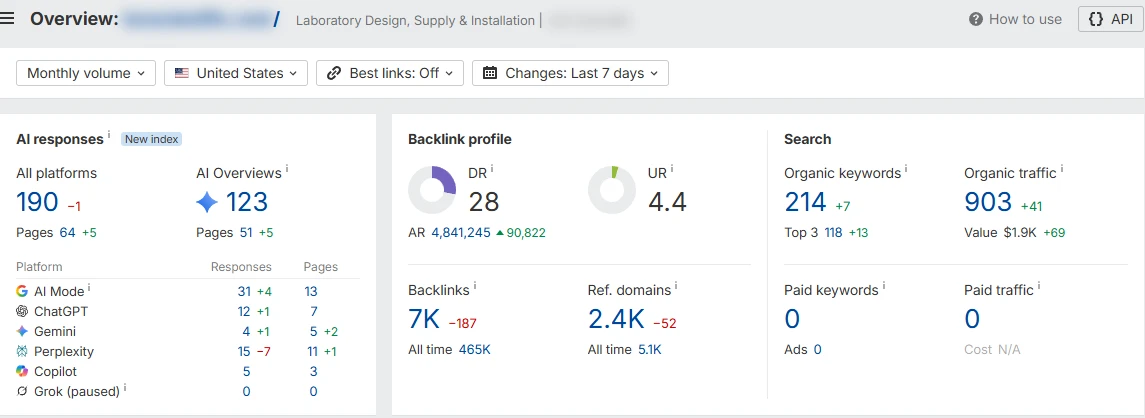
Search Console for that site shows 3,270 clicks over three months, roughly 1,090 a month from all countries, and GA4 counted 1,617 organic sessions in 28 days. So the estimate is in the right range here, a little low. On a mid-sized site with a clear topic, that is about as good as estimates get.
How to read an estimate without fooling yourself
- Compare trends, not totals. If a competitor's estimated organic traffic doubled in six months, something real probably happened, even if the absolute number is wrong.
- Compare sites inside one tool. Ahrefs vs Ahrefs is a fair fight. Ahrefs for one site and Similarweb for another is not.
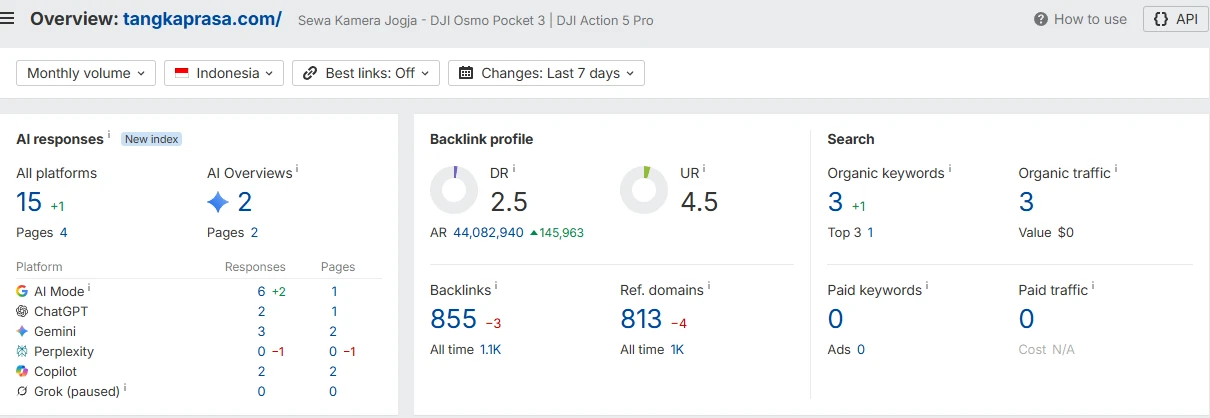
- Small sites are the least accurate. A local business with a few hundred visits a month often shows up as nearly zero, because the tool does not track the long-tail keywords that bring those visits. My own camera rental site, tangkaprasa.com, is a good example: Search Console recorded 702 clicks from 317 different queries over three months, while Ahrefs sees only 3 keywords and estimates 3 visits a month.
- Look at the pages, not just the number. The list of top pages tells you which content actually pulls visitors, which is more useful than any total.
If you want to go one step further and see the exact keywords behind a competitor's traffic, this guide on how to see what keywords a website ranks for walks through it.
Website traffic calculator: estimate traffic from keywords
Sometimes you want the reverse: "If I rank for these keywords, how much traffic could I get?" You can do the same math the tools do in a spreadsheet.
Estimated monthly visits = monthly search volume x click-through rate at your position
Click-through rate drops fast as you move down the page. Your own Search Console data is the best source for it: in the Performance report, turn on Average CTR and Average position, then look at the queries where you already rank well. Use those rates instead of an industry average.
A worked example with made-up volumes and assumed rates, just to show the math:
| Keyword | Monthly search volume | Expected position | Assumed CTR | Estimated visits |
|---|---|---|---|---|
| camera rental jogja | 1,000 | 3 | 10% | 100 |
| rent sony a6400 | 200 | 1 | 25% | 50 |
| camera rental near me | 2,000 | 8 | 2% | 40 |
| Total | 190 per month |
The volumes and CTR numbers in this table are example values, not real data or a benchmark. Ads, maps packs and AI answers at the top of the results all push clicks down, so treat the result as a range, not a promise.
The free keyword generator gives you hundreds of keyword ideas from Google autocomplete. Look up the search volume of the ones you like in a keyword tool, then plug them into the formula.
What counts as good traffic?
There is no universal number. A Jogja camera rental with 300 organic visits a month from people searching for rentals in their city can be doing better than a blog with 30,000 visits from readers who will never buy anything. Three checks matter more than the total:
- Is it the right traffic? Look at the queries in Search Console. Are they from people who could become customers?
- Is it growing? Compare the last three months to the same three months last year to remove seasonality.
- Does it convert? Set up a key event in GA4 (a form submit, a WhatsApp click) and watch how many visits turn into one.
If the traffic is there but nothing converts, the problem is usually the page, not the traffic. A website audit is the quickest way to find out what is holding the page back.
Frequently asked questions
How can I check the traffic of a website for free?
For your own site, use Google Analytics 4 and Google Search Console, both free and accurate. For someone else's site, use a free traffic checker such as Ahrefs Website Traffic Checker, Similarweb or Ubersuggest, and treat the result as an estimate.
What is the most accurate website organic traffic checker?
For your own website, Google Search Console, because the clicks come straight from Google. For a competitor, no tool is accurate in absolute terms. Pick one tool and use it consistently so the comparisons are fair.
How do I see daily visitors on my website?
In GA4, open Reports > Acquisition > Traffic acquisition and hover the line chart to see users per day. For visitors right now, open Reports > Realtime.
Why does a traffic checker show zero visits for my site?
Third-party tools only track a limited set of keywords. Small and local sites often get their visits from long-tail searches the tool does not track, so the estimate shows zero even when real visitors are arriving. Check Search Console for the real number.
Why are my GA4 and Search Console numbers different?
They measure different things. Search Console counts clicks from Google Search. GA4 counts sessions where its script loaded, from every channel, and misses visitors who block tracking. A difference of 10 to 20% on organic traffic is normal.
Can I see exactly how much traffic a competitor gets?
Not exactly, unless they share their analytics with you. Tools can only estimate it from rankings or panel data. Use the estimate for trends and comparisons, not as a fact.