 By Ilham Musyafa · October 30, 2024
If you keep refreshing a report and wondering why Google Search Console is not updating, start with one check: the "Last update" note at the top of the Performance report. Search Console processes data in batches, so it is never fully live. A Performance report a few hours behind is normal, and the Page indexing report trails by days. Only when the stamp is well past a day old, or a report has not moved for a week, is something actually stuck. This guide covers the normal lag per report, Google-side incidents, and the setup problems that really do freeze your data.
Search Console used to be called Google Webmaster Tools until Google renamed it in May 2015. If you searched "webmaster tools site performance not updating", the old site performance data is today's Performance report, and everything below applies.
Check the "Last update" stamp first
Open Performance, then Search results. Near the top, Search Console shows how many hours ago the data was last refreshed. That one line answers "is it stuck?" faster than anything else here.
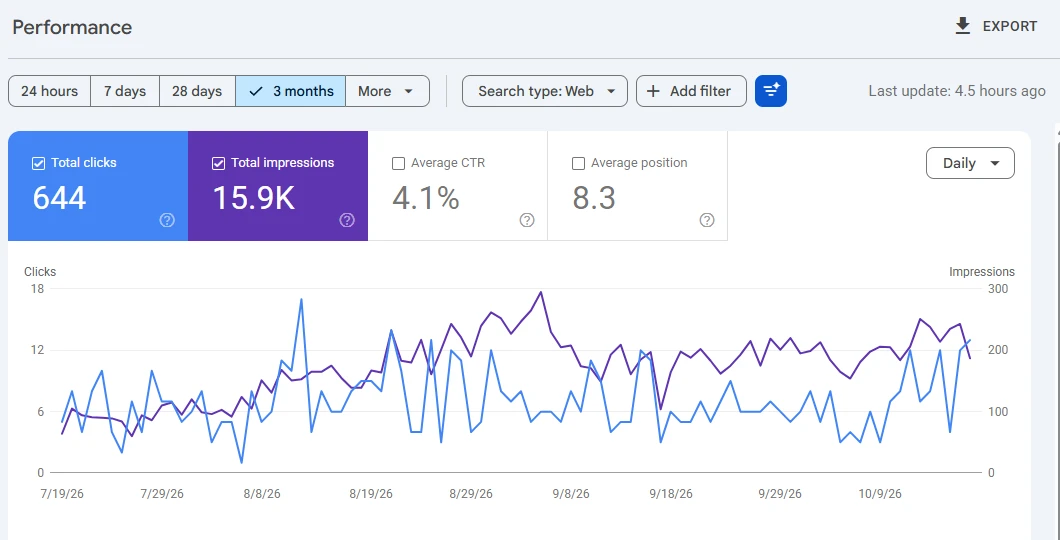
How to read it:
- A few hours. Normal. Search Engine Roundtable notes that the report is "generally" updated within a few hours.
- Up to about a day. Still inside normal variation. Nothing to fix.
- Two to three days or more. Unusual for the Performance report. Check whether Google has a known issue (next sections) before touching your site. In October 2026, for example, the stamp passed 64 hours for many sites at once.
If the stamp is fresh but the numbers look low, the cause is usually preliminary data or the date range, covered next.
How fresh each report is supposed to be
The reports do not share one schedule. Performance moving while Page indexing sits still is usually both behaving normally.
| Report | Normal freshness | What "stuck" looks like | Where to look instead |
|---|---|---|---|
| Performance, 24-hour view | Hourly, preliminary | No hourly points for a full day | Last update stamp |
| Performance, 7 days or longer | Complete days only | Stamp older than 2 to 3 days | 24-hour view |
| Page indexing | A few days behind | Last update date a week or more old | URL Inspection |
| Sitemaps | Each time Google reads the file | Last read date never changes | Sitemap checker, server logs |
| URL Inspection (live test) | Real time | Not applicable | This is the fresh view |
| Crawl stats, Links | Slow, aggregated | Weeks without change | Server logs |
Google does not publish a fixed refresh schedule for most of these, so treat the middle column as typical behaviour, not a promise.
The 24-hour view and preliminary data
The Performance report has a 24-hour option in the date filter. Google's Performance report help explains that in this view "the graph's data points represent hours and include preliminary data", and that "preliminary data is indicated by a dotted line on the graph". The newest data "might change in the next few hours" because it is still being collected.
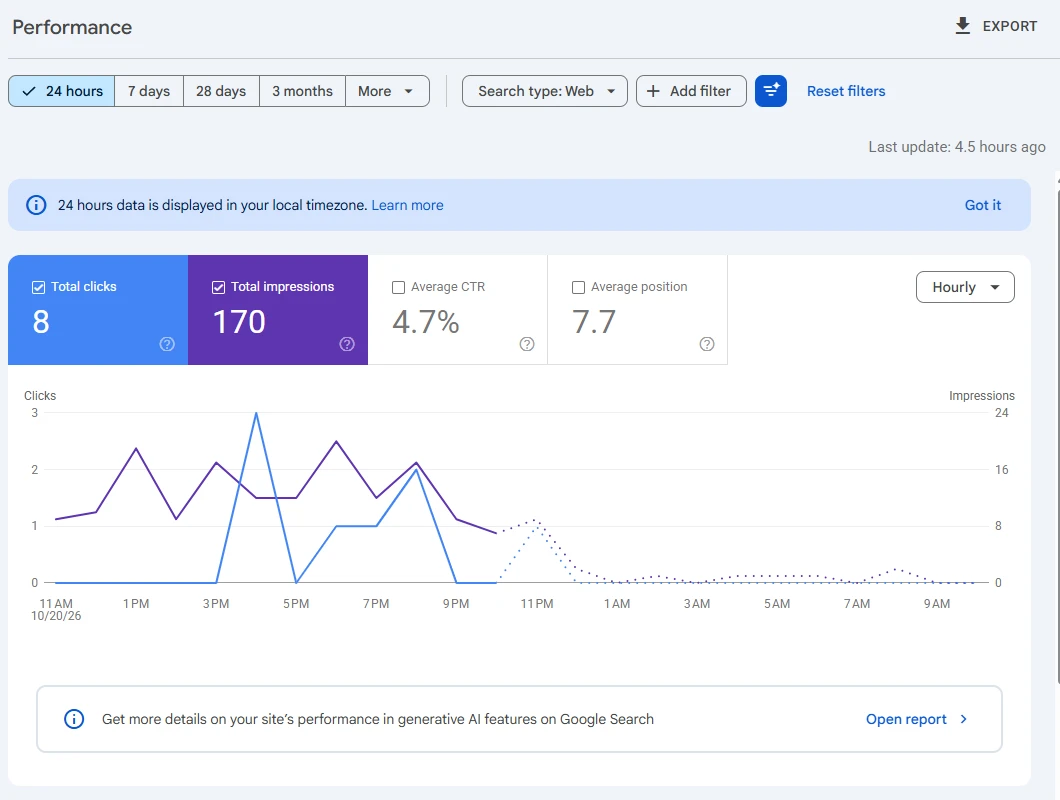
That explains "today's numbers changed after I looked": preliminary data being finalised. It also explains why the last day looks low. Never judge a drop from the last one or two days of data.
Dates in the default views are in Pacific Time, while the 24-hour view uses your local time, per Google's dimensions help page. From Jakarta or London, a report "day" does not match your calendar day.
Page indexing and Sitemaps lag more than Performance
Page indexing runs on a slower cycle. After a long incident in December 2025, Search Engine Roundtable saw it showing data three days old and called that a normal delay for this report. A page published yesterday will not appear there yet, even if Google already crawled it.
The Sitemaps report changes only when Google reads your sitemap again. A "Last read" date a few days old is normal on a small site. One that never moves is a sitemap problem, covered below.
URL Inspection is the only near real-time view
For the state of one page right now, run the live test in URL Inspection. The indexed result shows what Google stored at its last crawl; the live test shows what it would see today. A passing live test does not mean the page is indexed.
When it is Google, not you
Sometimes the pipeline really does stall on Google's side, and there is nothing on your site to fix.
Look first at Google's official Data anomalies in Search Console page, which lists known logging problems by report and date. In 2026 it includes under-reported impressions in the Generative AI report in Search from August 13 to 17 (later restored) and several Discover logging errors, most marked as affecting data logging only.
Delays do not always make that page. Two recent ones, reported by Search Engine Roundtable:
- November to December 2025. The Page indexing report sat on November 21 data for almost a month, and the Performance reports were also badly delayed. Google fixed Performance on December 16 and Page indexing caught up by December 17. While it was stuck, the report carried a notice: "Due to internal issues, this report has not been updated to reflect recent data."
- October 11, 2026. The Performance report was more than 64 hours behind for many sites, shortly after a spam update. It was back to normal on October 12.
If your stamp is days old, look for "Search Console delayed" news from this week and Google Search Central's social posts. A delay hitting many sites shows up there within hours.
If clicks dropped on the same days the report looks stuck, check the dates against the Google algorithm update timeline. If an update started then, the drop may be real and only the reporting is late. If nothing rolled out and the anomalies page lists a logging error, the dip should backfill.
When the cause is on Google's side, resubmitting sitemaps or re-verifying does nothing. Wait it out.
When it actually is your setup
If the delay is well past the normal window and Google reports no incident, check your own configuration.
Verification quietly broke
If your DNS record, HTML file, meta tag, or Google Analytics verification was removed, you can lose verified access to the property and its reports. This often happens after a redesign or a move to a new host or DNS provider. Open Settings, then Ownership verification, and re-verify if needed. A DNS TXT record on a domain property is the method least likely to break during a rebuild.
You are looking at the wrong property
Many "not updating" cases are just the wrong view. With both a domain property and URL-prefix properties (http and https, www and non-www), traffic may land in a different one than the one you are checking. Even the Performance report for this site still lists some pages twice, once on www and once without, from before the July 2026 move off WordPress.
The same mismatch causes "URL is not in property" in URL Inspection. Prefer a single domain property, which covers every protocol and subdomain.
Something changed on the site itself
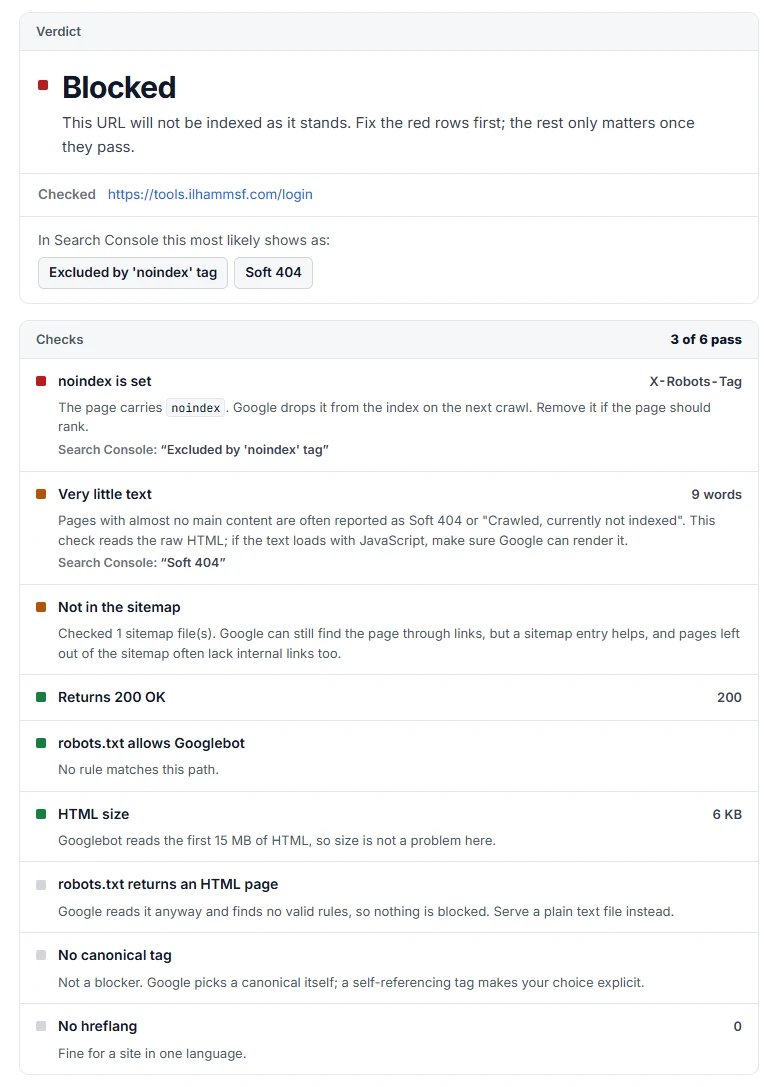
A new noindex tag, a robots.txt block, a canonical pointing elsewhere, or a migration can stop specific pages from collecting data. The report is fine, but those pages look frozen.
When one page stops updating while the rest of the site moves, test it in the indexability checker. If it shows a canonical pointing to a different URL, Search Console credits the data to that other URL, so the page you watch looks frozen.
The sitemap is not being processed
If the "Last read" date is old and the discovered URL count never moves, run the sitemap through the sitemap checker. Fix "lastmod dates in the future" or a redirecting sitemap URL first: future dates teach Google to distrust your lastmod, and a redirected sitemap is not the file Google ends up reading. For "temporary processing error" or "Couldn't fetch", see the sitemap temporary processing error guide.
A manual action is in place
Check Security and Manual actions, then Manual actions. A manual action does not freeze Search Console, but affected pages can lose visibility, so impressions flatten and the data looks stopped. The report says what to fix and how to request a review.
It is your browser, not GSC
Hard refresh, try an incognito window or another browser, and disable extensions that inject scripts. Also check which Google account you are signed in with: a second account that only sees an old property is a classic source of stale data.
The API, Looker Studio or BigQuery export lags behind the UI
If a dashboard is behind but the Search Console interface is current, the problem is the data pipe. The Search Analytics API returns only finalized data unless the request sets dataState to all (or hourly_all), so tools using the default trail the interface by a day or more. Connectors and spreadsheet add-ons also cache results, and the bulk export to BigQuery runs daily. My self-hosted Search Console dashboard reads from the API, so the data state is the first thing I check when it lags.
"Request indexing" and "Validate fix" that seem to do nothing
Request indexing adds the URL to a priority crawl queue, with a daily quota per property. It does not guarantee indexing: Google can crawl a page and still choose not to index it. The usual causes are in why your pages are not indexed.
Validate fix rechecks every affected URL, which Google says usually takes up to about two weeks. "Not started" or "Started" for several days is normal, and clicking again does not speed it up.
What Search Console data never shows, so do not wait for it
- Anonymized queries. Google omits some queries for privacy. They count in chart totals but never appear as rows, so the queries table adds up to less than the total.
- Row limits. Search Console keeps "only the most important data rows", and interface tables stop at 1,000 rows. For more, Google points to the bulk data export.
- 16 months of history. Performance data goes back 16 months, no further. Export regularly if you need more.
- Data before the property existed. A new property starts collecting when it is created. Older data is not backfilled.
A calm troubleshooting order
- Read the "Last update" stamp and compare it with the normal lag for that report.
- Ignore the last one or two days, or use the 24-hour view for today.
- Check Google's Data anomalies page and this week's Search Console news.
- Rule out browser cache, extensions and the wrong Google account.
- Confirm the right property and valid verification.
- Run a URL Inspection live test on the page that looks frozen.
- Check the Sitemaps "Last read" date and the Manual actions report.
- If only a dashboard lags, check the API data state and connector caching.
Frequently asked questions
How often does Google Search Console update?
The Performance report usually refreshes within a few hours, and the 24-hour view shows hourly, preliminary data. The Page indexing report updates more slowly, typically a few days behind. URL Inspection with a live test is the only real-time view.
Why is Google Search Console not showing data for the last few days?
The default views include only complete days, and the newest data can still be preliminary. Check the "Last update" stamp: if it is only hours old, the data is current and the recent days will fill in. If it is several days old, look for a known Google incident first.
How long is a normal Google Search Console data delay?
A few hours for the Performance report is normal, and up to about a day is still unremarkable. Delays of 2 to 3 days or more are unusual and are usually Google-side incidents, like the 64-hour delay in October 2026. For Page indexing, a few days behind is normal.
Is Google Search Console accurate?
It is the most accurate source for Google Search data, but it is not complete. Anonymized queries are hidden, tables show only the top rows, and the newest data is preliminary. Logging errors happen too, which is why Google keeps a public Data anomalies page.
How long does Google Search Console keep data?
Performance data covers the last 16 months. Anything older is gone unless you exported it through the interface, the API, or the bulk data export to BigQuery.
Why is Google Search Console request indexing not working?
Request indexing only puts the URL in a crawl queue, and there is a daily quota. Google can crawl the page and still decide not to index it, for example because of a noindex tag, a canonical pointing elsewhere, or thin or duplicate content. Use URL Inspection to see which applies.
Does a Search Console data delay affect my rankings?
No. A delay is a reporting problem, not a crawling or ranking problem. Google's Data anomalies page describes these incidents as affecting data logging only, so your site keeps appearing in Search while the report catches up.
The honest takeaway
Most "Google Search Console not updating" moments are not failures. Each report runs on its own deliberate delay. Read the Last update stamp, check Google's anomalies page before touching your site, and use URL Inspection when you need something live. Save your energy for the rare real breaks: lost verification, the wrong property, or a page that changed under you.
If your data has been stuck for weeks and none of this explains it, a website audit will surface whatever is really going on, or just get in touch and I will help you dig in.