 By Ilham Musyafa · May 30, 2026
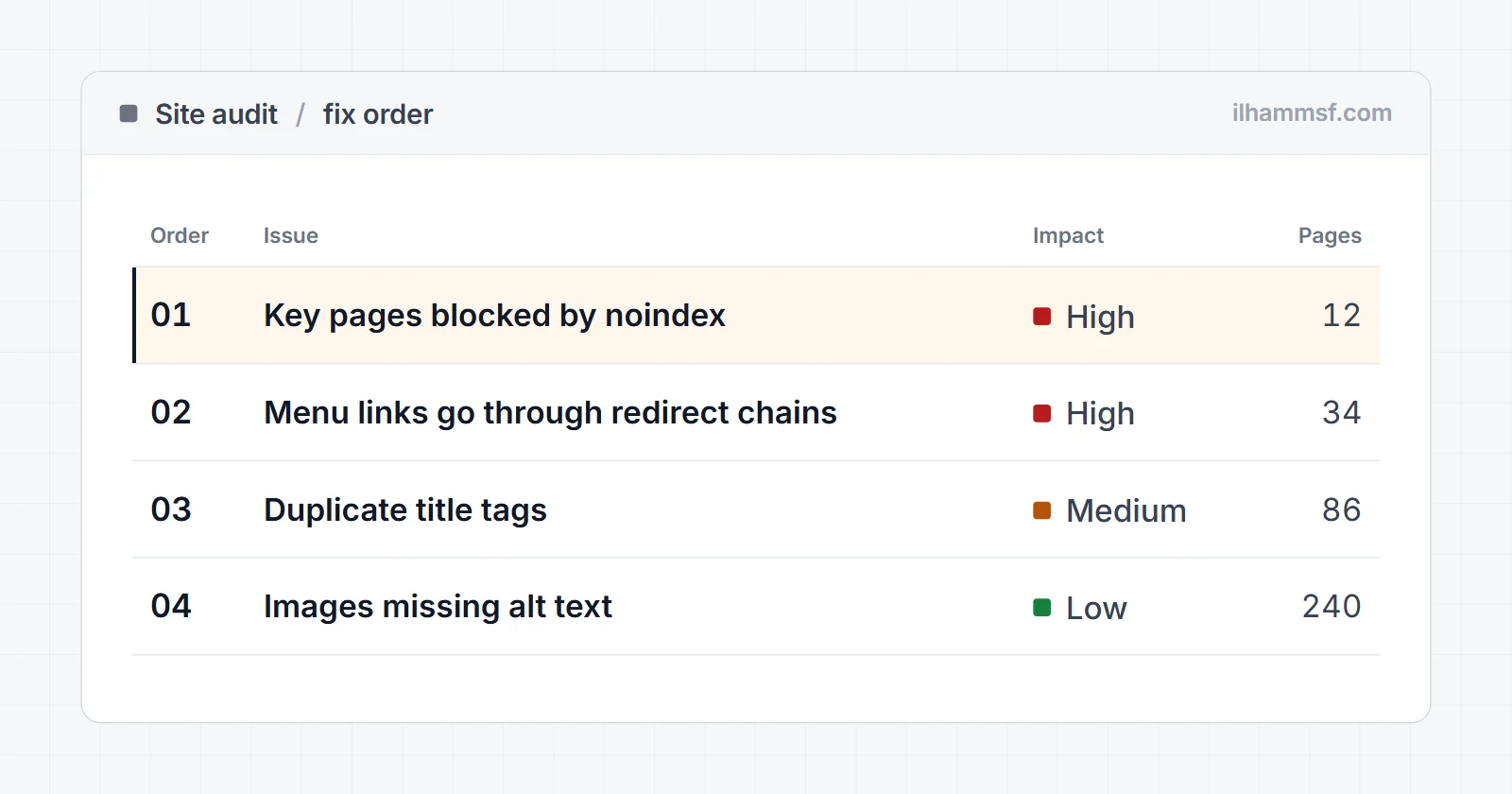
To do a website audit, decide first what the site has to achieve, then check the pages that matter in a fixed order: can Google index them, are they fast for real visitors, do titles and content match what people search for, and can a visitor actually contact you or buy. Write every problem down with evidence, score each one by impact and effort, and hand over a short ordered list with a first action for each item. Most audits fail at that last part. They find too many things, dump them into a 60-page report, and leave you with no idea where to start.
This guide covers the scope, nine audit steps, a checklist you can copy, the impact x effort method I use to rank findings, and how to write a finding so a developer can fix it without a meeting.
What is a website audit?
A website audit is a structured check of a site against a goal: more leads, more sales, or more visibility in search. It looks at the technical foundation, search visibility, content and the path a visitor takes to act, and it ends with a prioritized list of fixes. Without that last part it is an inventory, not an audit.
Several names cover overlapping jobs. Knowing which question each answers keeps the scope honest:
| Audit type | Question it answers | When it fits |
|---|---|---|
| Website audit | What holds this site back overall? | Before a redesign, ads, or when results stall |
| SEO audit | Why is search traffic not growing? | Organic traffic is flat or falling |
| Technical SEO audit | Can Google crawl and index the site? | After a migration or indexing drop |
| Content audit | Which pages to keep, update, merge or remove? | Blogs with years of old posts |
| UX / CRO audit | Why do visitors not convert? | Traffic is fine, leads are not |
This guide is a website audit with a strong SEO core: the technical and search checks in full, plus the content and conversion checks that decide whether the traffic is worth anything.
Before you crawl: set the goal and the scope
The most useful hour of an audit happens before any tool runs. Decide what "better" means for this site, because every finding gets judged against it. A broken meta tag on a page nobody visits is not urgent. A slow, confusing checkout is.
Answer three questions in writing:
- What is the one action you want visitors to take? A form, a WhatsApp chat, a call, a purchase, a booking.
- Which pages lead to that action? Usually the homepage, main service or category pages, top blog posts and the contact or checkout page.
- What changed recently? A redesign, a new platform, a plugin update, a traffic drop on a known date.
Then pick 10 to 20 priority pages. On a small business site that is often the whole site. On a large site, audit the templates (one product page, one category page, one post), because a problem in a template repeats on every page built from it.
On my own camera rental business, Tangkap Rasa, the page that matters most is the booking form. An audit that spent its first ten findings on blog meta descriptions would be correct and useless at the same time. Scope is what prevents that.
How to do a website audit, step by step
Here is the order I work in. Every step uses free tools and feeds the findings list you rank at the end.
- Pull the baseline from Search Console and GA4.
- Check crawlability and indexability.
- Check speed and Core Web Vitals.
- Check on-page SEO: titles, descriptions, headings, internal links.
- Check content against search intent.
- Walk the conversion path on a phone.
- Check local and trust signals.
- Check AI search readiness.
- Record every finding with its evidence.
Step 1: Pull the baseline
Record where the site stands before you fix anything, so you can prove later that the fixes moved something. Export the last 3 months of queries and pages from the Search Console Performance report and note total clicks and impressions. In GA4, note sessions and the key event that matters (form submit, purchase, WhatsApp click) for the same period.
Look for two things while you are there: sudden drops on a specific date, and pages with plenty of impressions but almost no clicks, which are usually title and snippet problems for step 4. If conversions are not tracked at all, that is your first finding. An audit cannot judge what matters if nobody can see which pages produce leads.
Step 2: Crawlability and indexability
This is where the expensive problems hide, because a page Google cannot index cannot rank. In Search Console, open Indexing, then Pages. The Page indexing report splits URLs into indexed and not indexed and lists the reasons, such as "Excluded by 'noindex' tag", "Page with redirect", "Not found (404)" and "Crawled - currently not indexed".
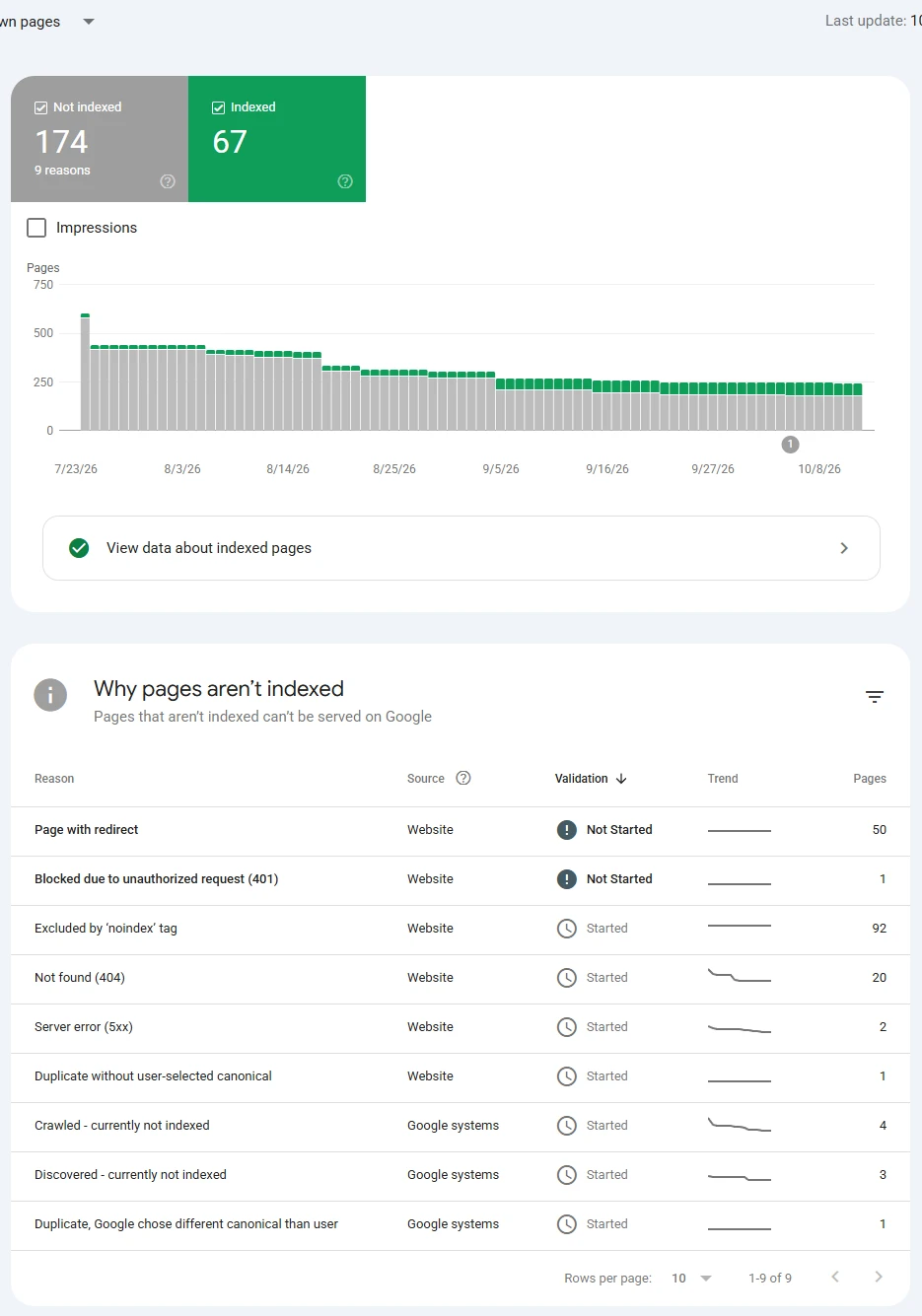
Do not panic at the not indexed number. Most of it is normally fine: redirects, old URLs, pages that correctly canonicalize elsewhere. On this property, a large share are leftover spam URLs from the old WordPress install, and those are supposed to stay out of the index. What you are looking for is a priority page under a reason it should not have. My guide on why pages are not indexed explains each reason.
Next, check the priority pages one by one. I run each URL through the indexability checker, which fetches the page like a crawler and reports the status code, redirects, robots.txt, noindex in the meta tag or X-Robots-Tag header, the canonical, and whether the URL is in the sitemap. A healthy page returns 200, has no noindex, a self-referencing canonical, is allowed by robots.txt and is in the sitemap.
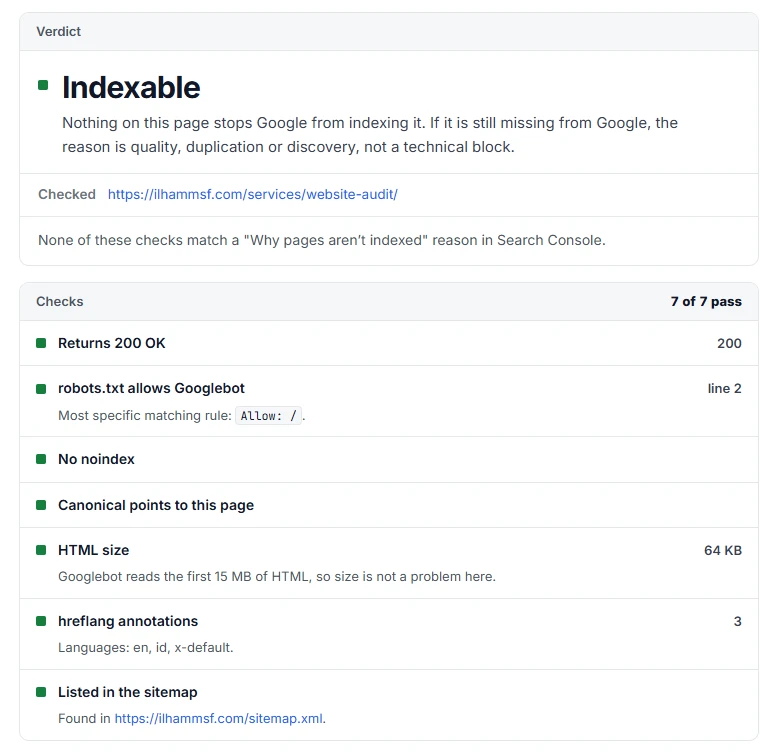
The finding that belongs at the top of an audit looks like this: the main service page returns 200 but still carries a noindex left over from staging. It loads fine for every visitor, so nobody notices, and it will never appear in Google. The checker prints the matching Search Console label ("Excluded by 'noindex' tag"), which makes it easy to cross-check.
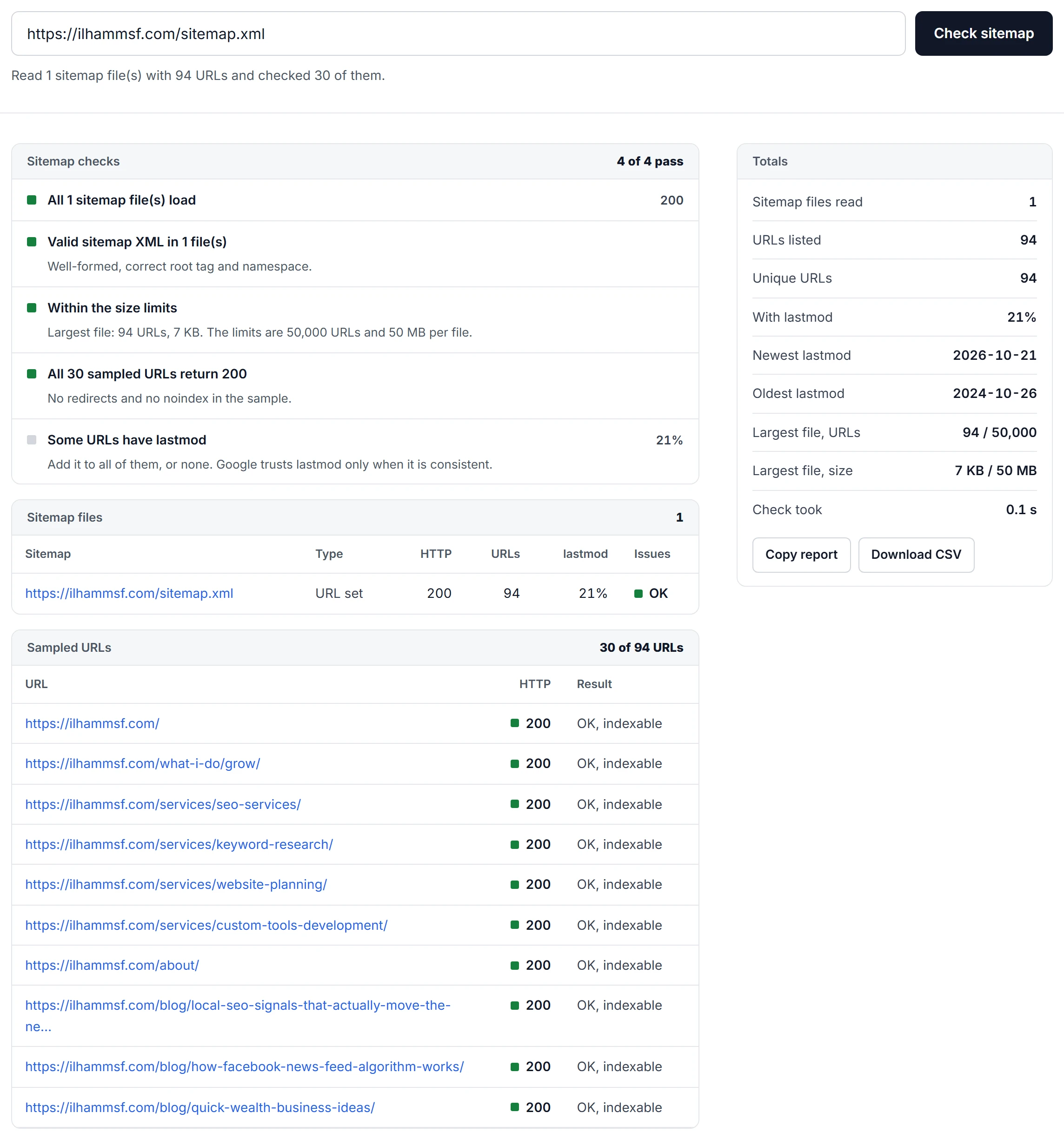
Then check the sitemap as a whole with the sitemap checker. It confirms the file is real XML within the size limits, reports lastmod coverage, and samples the listed URLs for redirects, 404s and noindex. Say a sitemap lists 240 URLs and 30 of them redirect or 404 (a hypothetical example): you are asking Google to crawl pages you no longer want, and the fix is one ticket for the sitemap generator, not 30.
Finish with three quick checks: the site resolves to one version (http and www redirect to the final URL in one hop), robots.txt blocks nothing you want indexed, and internal links do not pass through redirect chains. If Search Console reports sitemap errors, see my guide to the sitemap temporary processing error.
Step 3: Speed and Core Web Vitals
Google's Core Web Vitals are measured on real visitors: Largest Contentful Paint (good is 2.5 seconds or less), Interaction to Next Paint (200 milliseconds or less) and Cumulative Layout Shift (0.1 or less).
Field data comes from real Chrome users and is what Google uses; you see it in the Core Web Vitals report in Search Console and at the top of PageSpeed Insights. Lab data is one simulated Lighthouse test and is what you use to find the cause. Small sites often have "not enough data" for field metrics. Then test priority pages in PageSpeed Insights on mobile and treat the lab result as a guide, not a verdict.
Do not chase a perfect score. Write findings about specific causes instead: a 3 MB hero image, a chat widget blocking the main thread, a font that shifts the layout. Those are tasks. "Performance score 54" is not.
Step 4: On-page SEO
For each priority page, check the title tag, meta description, H1 and the internal links pointing to it. You want one clear H1, a title that leads with what people search for, and a description that gives a reason to click.
The SERP preview tool shows where Google is likely to cut the title and description (the cut happens by pixel width, not a fixed character count), and reads the H1 and canonical from a live URL. A title like "Website Audit Services | Company Name Digital Marketing Agency" gets cut before the part that sets it apart. Move the differentiator to the front.
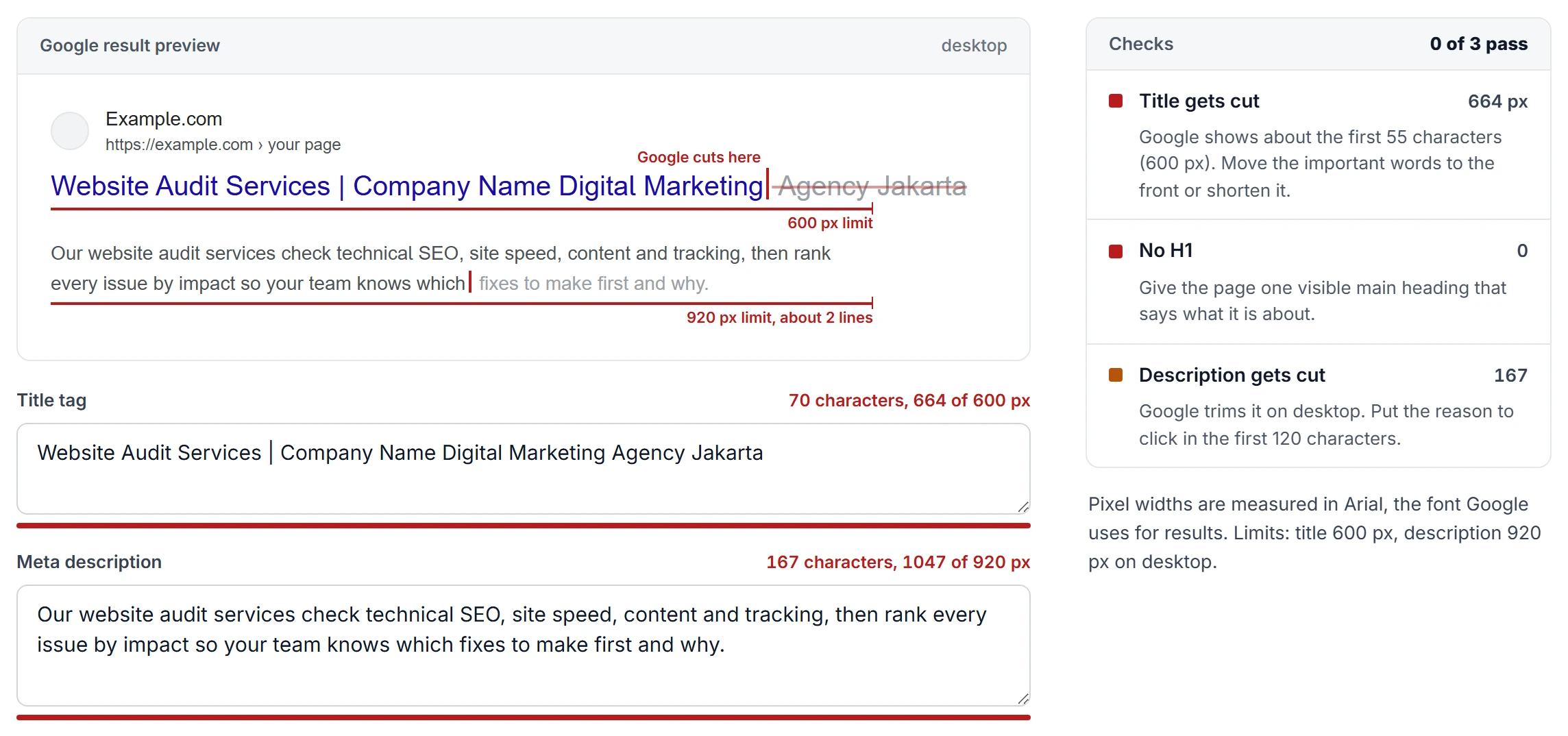
Google rewrites titles and descriptions it thinks do not match the page, so aim for accurate, not clever. Then check internal links: an important page linked only from the footer is a common and cheap finding.
Step 5: Content and search intent
Search the main query for each priority page and look at what ranks. If Google shows comparison guides and your page is a sales page, or the top results show prices and yours hides them, the content does not match the intent, and on-page tuning will not fix that.
Then look for thin pages (a few generic lines on a service or location page), outdated pages (old prices, discontinued products) and overlap, where two pages chase the same query. Overlap is real but over-diagnosed; my guide to keyword cannibalization shows how to tell real cases from noise in Search Console.
Step 6: The conversion path
Now stop being an SEO and be a customer. On a real phone, on mobile data, land on the top three pages from search and try to do the one thing the site exists for. Fill in the form. Tap the phone number and the WhatsApp button. Get to the payment step.
Note everything that slows you down: a button hidden below three screens of text, a pop-up covering the close button, a price that only appears after sign-up. And confirm submissions actually arrive. A form that looks like it works but sends nothing is one of the most expensive problems an audit can find, and only a human doing the task finds it. Search Console's Mobile Usability report was retired in December 2023, so no report does this for you.
Step 7: Local and trust signals
If the business serves a city or region, check the Google Business Profile: category, hours, phone, photos, reviews and replies, and a name, address and phone that match the website exactly. My guide to local SEO signals covers which of these move rankings.
For any business, check the trust basics: a real about page, a reachable contact page, clear refund or delivery policies, and https without mixed content warnings. Crawlers rarely flag these, and they often decide whether a first-time visitor gets in touch.
Step 8: AI search readiness
People also find businesses through AI answers now. The honest version of this check is short. Google says its AI features have no extra requirements: the same foundational SEO practices apply, and the page must be indexed and eligible for a snippet.
What you can check: the main content is in the HTML the server sends, not only injected by JavaScript; robots.txt allows the AI crawlers you want (GPTBot or ClaudeBot, for example) and blocks the ones you deliberately do not; and structured data such as Organization, LocalBusiness or Product matches the page. Anything beyond that is speculation, and it does not belong in an audit as a finding.
Step 9: Record every finding with evidence
Use one sheet row per issue: what is wrong, the full URL, the evidence (screenshot, tool output, Search Console label) and why it matters for the goal. A finding without evidence turns into a debate. A finding with a screenshot and a URL turns into a task.
Website audit checklist
Use this as the working checklist for steps 2 to 8. Anything that does not match the "Pass" column becomes a row in your findings sheet.
| Area | Check | How | Pass looks like |
|---|---|---|---|
| Tracking | Key event tracked | GA4 key events | Leads or sales recorded |
| Indexing | Priority pages indexed | URL Inspection | "URL is on Google" |
| Indexing | No stray noindex | Indexability checker | Indexable |
| Indexing | Canonicals | Indexability checker | Self-referencing |
| Indexing | Not indexed reasons | GSC Page indexing | No priority page excluded |
| Crawling | robots.txt rules | robots.txt tester | Nothing important blocked |
| Crawling | Sitemap valid | Sitemap checker | Valid XML, 200 URLs only |
| Crawling | One site version | Load http and www | One hop to final URL |
| Crawling | Internal links | Crawler | No 404s, no chains |
| Speed | Core Web Vitals | GSC, PageSpeed | Good on mobile |
| Speed | Heavy files | Lighthouse | No oversized images |
| On-page | Titles | SERP preview | Unique, not cut early |
| On-page | Meta descriptions | SERP preview | Written for key pages |
| On-page | H1 | Crawler | One, matches topic |
| On-page | Inlinks to key pages | Crawler | Linked from relevant pages |
| Content | Intent match | Manual SERP check | Same format as top results |
| Content | Thin or outdated | Manual review | Current and specific |
| Content | Overlap | GSC Performance | One page per query |
| UX | Mobile conversion path | Real phone | Task done without friction |
| UX | Forms deliver | Test submission | Message arrives |
| Local | Business Profile | Profile manager | Complete, consistent NAP |
| Trust | HTTPS, contact, policies | Manual check | Present and reachable |
| AI search | Content in HTML | View source | Main text in source |
| AI search | Structured data | Rich Results Test | Valid, matches page |
How to prioritize findings: impact x effort
This step separates an audit people act on from one they file. Give each finding two scores from 1 to 5. Impact: how much fixing it moves your goal (5 blocks leads or rankings on a priority page). Effort: how much work it takes (1 is a setting, 5 is a project). The priority score is impact x (6 minus effort), so high impact and low effort float to the top.
Here is how that plays out on a hypothetical 40-page service business site:
| Finding | Impact | Effort | Score | Order |
|---|---|---|---|---|
| Main service page has leftover noindex | 5 | 1 | 25 | 1 |
| Contact form fails silently on iPhone | 5 | 2 | 20 | 2 |
| 3 MB hero image, poor mobile LCP | 3 | 2 | 12 | 3 |
| Sitemap lists 30 redirected URLs | 2 | 1 | 10 | 4 |
| Two posts compete for one query | 2 | 3 | 6 | 5 |
| 300 tag archives lack meta descriptions | 1 | 2 | 4 | Skip |
| Navigation redesign | 3 | 5 | 3 | Later |
Look at what happened to the finding a crawler shouts about loudest. Three hundred missing descriptions on tag archives is the biggest number in the report and the smallest problem: nobody searches for those pages, and the better fix is usually to noindex the archives. The single noindex on the money page is one line in a tool report and the first thing to fix.
Two rules keep the scoring honest. Score impact against the goal you wrote down before the audit, not against what a tool labels "critical". And cap the first round at three to five items. A short list that gets done creates proof, and proof gets the next round approved.
What a useful website audit report looks like
The findings sheet is your working file. What you hand over is short:
- The goal and scope in one paragraph.
- The baseline numbers from step 1.
- The top three to five findings in order, each with evidence and a first action.
- The remaining findings, grouped and ranked for later rounds.
- When to re-check, and which number should move.
In six years of SEO, mostly at a US agency, the audits I saw get acted on were the ones where each finding could go straight to whoever does the fix. For anything a developer touches, that means a ticket. Here is the first finding above written that way (a hypothetical example):
Title: Remove leftover noindex from /services/plumbing-repair/

Problem: The page returns 200 but sends <meta name="robots"
content="noindex">. Search Console lists it under
"Excluded by 'noindex' tag".

URL: https://example.com/services/plumbing-repair/
Evidence: indexability checker result + GSC screenshot attached

Fix: Remove the noindex from the page template. Confirm the
staging "discourage search engines" setting is off in production.

Done when: the indexability checker shows "indexable" and
URL Inspection > Test live URL shows indexing allowed.
Then click Request indexing.

Priority: 1 (impact 5, effort 1)
A developer can do that in ten minutes without a question. "Fix indexing issues on service pages" starts a meeting instead. The "Done when" line matters most: it says how to verify the fix, so nobody closes the ticket on a guess.
What tools and AI can and cannot tell you
An automated site score is not an audit. Crawlers are excellent at finding things across thousands of URLs: every missing tag, every redirect, every slow page. They cannot weigh those things against your business. A tool flags a missing meta description and a noindex on your best page with similar alarm, because it does not know which page earns money.
AI assistants are now part of many audits, and they help with the grind: summarizing a crawl export, grouping 400 issues into themes, drafting tickets from your notes. They still need a human to set the goal, to confirm that what they say about a URL is true on that URL, and to decide what goes first. An AI that has not seen your Search Console data or tested your form on a phone cannot tell you the form is broken.
Free website audit tools
You can run a solid audit with free tools only:
- Google Search Console: Page indexing, Performance, URL Inspection, Sitemaps and Core Web Vitals. Google's own data, so the most important source.
- Google Analytics 4: traffic and key events by landing page.
- PageSpeed Insights: field data when available, plus a Lighthouse test that lists causes.
- A desktop crawler: Screaming Frog's free version crawls up to 500 URLs, enough for most small sites.
- Rich Results Test: structured data on a live URL.
- The checks on this site: indexability and sitemap checkers for step 2, SERP preview for step 4.
- A real phone: still the best tool for step 6.
How often to audit, and when
A full audit once a year is enough for most small business sites, with a monthly look at the Page indexing and Performance reports in between. Run one outside that schedule when:
- You are about to redesign or migrate. Audit before, so you know what to protect, and again right after launch.
- You are about to spend on ads or content. Paying to send traffic to a broken form is the most expensive mistake on this list.
- Traffic or leads dropped and you do not know why. Compare the date with your own changes and with the Google algorithm update history first.
- The platform changed. When I moved ilhammsf.com off WordPress to a hand-coded build in July 2026, the first thing I did after launch was re-run the indexing and sitemap checks.
DIY or hire someone?
If the site is small and you know your way around Search Console, you can do everything here yourself. The checklist and the scoring table are the hard parts, and they are above.
Hiring makes sense when the site is large, when something already went wrong (a traffic drop, a migration, a hacked site), or when you need someone to write the tickets and work with the developer. Cost depends on the number of pages and templates, the platform, the depth (SEO only, or also UX and conversion) and whether implementation support is included. Ask any auditor for a sample deliverable first. If it is a long tool export with a logo on top, you know what you will get.
Frequently asked questions
What is the difference between a website audit and an SEO audit?
An SEO audit asks why search traffic is not growing and covers indexing, technical health, on-page SEO and content. A website audit includes those checks plus the conversion path, trust signals and user experience. If traffic is fine but leads are not, you need the broader one.
How long does a website audit take?
For a small business site with 10 to 50 pages, plan on one to three days of focused work including the write-up. Large sites take longer mainly because of the number of templates and the time needed to confirm each finding, not because of the crawl itself.
How often should I audit my website?
A full audit once a year is enough for most small sites, with a monthly look at Search Console in between. Add one before a redesign, migration or big spend on ads or content, and whenever traffic drops without an obvious reason.
Can I do a website audit for free?
Yes. Search Console, GA4, PageSpeed Insights, a free crawler and a real phone cover almost everything in this guide. What free tools cannot give you is the prioritization, which is judgment rather than software.
What should I fix first after a website audit?
Anything that stops priority pages from being indexed or stops visitors from contacting you or buying. After that, sort by impact x effort and do high impact, low effort items first. Cosmetic issues on pages nobody visits can wait.
Can AI do a website audit?
AI can speed up parts of one, such as summarizing crawl data, grouping issues and drafting tickets. It cannot verify what it has not seen, like your Search Console data or whether your form works on a phone, and it does not know your goals unless you tell it. Use it as an assistant to the audit, not as the audit.
What should a website audit report include?
The goal and scope, baseline numbers, the top three to five findings in order with evidence and a first action each, the remaining findings grouped for later, and a date to re-check. Developer-facing findings should be written as tickets with a clear "done when" line.
An audit is only worth doing if it ends in a plan you will actually execute. If you would rather have someone do the teardown and write the tickets, here is what my website audits cover, or get in touch and tell me what the site needs to achieve.