 By Ilham Musyafa · December 3, 2024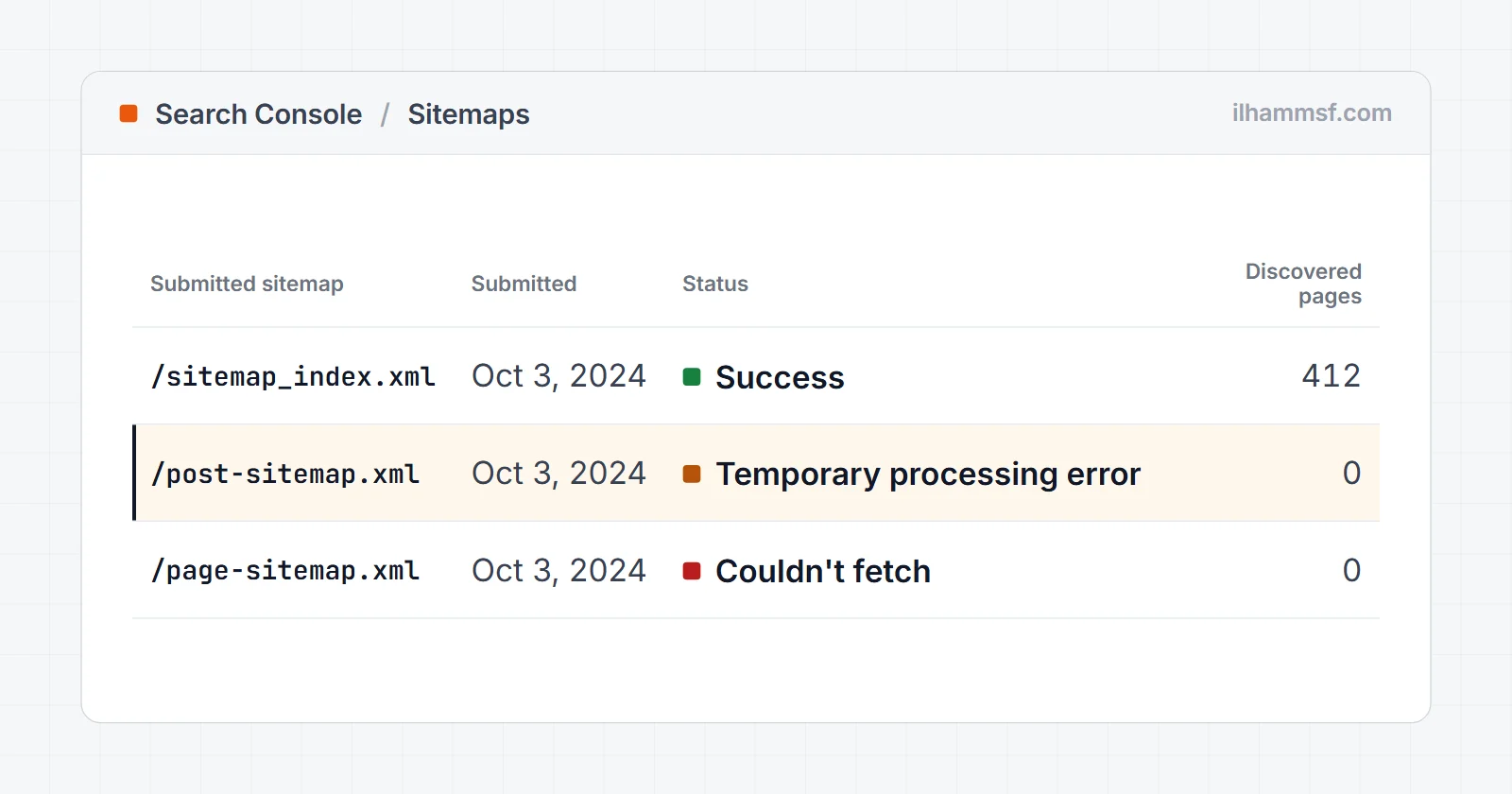
If you just submitted a sitemap and Google Search Console flashed a sitemap temporary processing error, take a breath first. In most cases the word "temporary" is honest: Google could not finish reading your sitemap on that attempt, and a re-check a day or two later shows a clean "Success." The trap is assuming it is always harmless. Sometimes that message is Google's polite way of saying your sitemap has a real defect. This guide helps you tell the two apart quickly, then fix the actual cause instead of refreshing the page and hoping.
What the error actually means
Search Console fetches your sitemap file, parses the XML, and reads the URLs inside it. The "Couldn't fetch" or temporary processing status appears when any step in that chain fails or times out. Google has not rejected your site. It has simply parked the sitemap and will try again. The important question is not "how do I make the message disappear," it is "will the next fetch succeed on its own, or will it keep failing?" Everything below is about answering that.
Google's own Sitemaps report help page describes the temporary error the same way: its system hit a temporary problem while processing your sitemap, you generally do not need to resubmit, and Google will try to fetch it again later. Only if the error is still there after several hours does Google suggest resubmitting. That matches what I see on real properties: most of these clear within a day without anyone touching anything.
It also helps to know what the error does not do. A sitemap is a discovery aid, not a ranking factor. While it is stuck, Google still finds your pages through internal links, and pages that are already indexed stay indexed. The cost of a failing sitemap is slower discovery of new and updated URLs, which matters most on large sites and sites that publish often.
Temporary processing error vs Couldn't fetch vs Has errors
Search Console uses a handful of similar sounding statuses, and people search for all of them interchangeably. They are not the same problem, so read the exact wording in the Status column before you start fixing.
| Status in Search Console | What happened | Usually your problem? | First thing to check |
|---|---|---|---|
| Success | Google fetched and parsed the file | No | Nothing. Check the discovered URL count looks right |
| Temporary processing error | Google fetched or tried to, then its own processing failed | Usually not | Wait a day, then see the checks below |
| Couldn't fetch | Google could not download the file at all | Often yes | Does the URL return 200 with XML to a non-browser visitor? |
| Sitemap could not be read / General HTTP error | The request returned an error code or something that is not a sitemap | Yes | Status code, firewall rules, the submitted URL |
| Has errors | The file was read, but some entries or tags are invalid | Yes | Click the sitemap to see the error list and line numbers |
Here is what that looks like on a real property, my own:
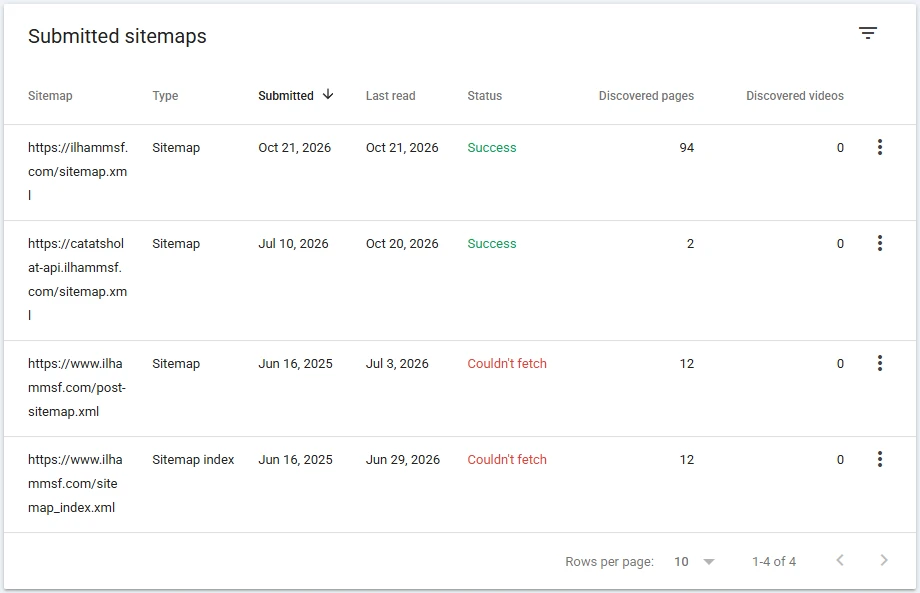
The two Couldn't fetch rows are the Yoast sitemaps from when this site still ran on WordPress. After the move to the current build, those files stopped existing, so Couldn't fetch is the correct status: there is nothing left to fetch. The right fix there is to remove the old entries, not to debug them, because the sitemap that matters reads Success.
A status that flips between "Temporary processing error" and "Couldn't fetch" for more than a few days is no longer temporary. Treat it as a fetch problem and work through the causes below.
First, rule out the boring cause: it is genuinely temporary
Before you change anything, check whether the problem is on Google's side or a passing blip on yours.
- Open your sitemap URL directly in a browser (for example
yourdomain.com/sitemap.xml). If it loads as clean XML, your file is reachable right now. - Wait 24 to 48 hours without resubmitting repeatedly. Hammering the "Submit" button does not speed anything up and can muddy the status.
- Check whether your host had downtime around the time of the error. If Google tried to fetch during a maintenance window or a traffic spike, the retry will usually succeed.
- Paste the sitemap URL into the URL Inspection bar at the top of Search Console and run a live test. If it shows the page can be fetched, Google can reach the file today and the old status is just waiting for the next scheduled read.
If the status clears after a day, you are done. If it keeps failing, the sitemap has a real issue, so keep going.
One caution about the browser test: your browser is a logged-in human with cookies, a normal user agent, and often a cached copy. Google is none of those. A sitemap that opens fine for you can still be blocked, empty, or an HTML page for a crawler, which is why the causes below matter even when "it works on my machine."
The real causes, and how to fix each one
Your server did not respond in time
Search Console will report a processing error if your server was slow, down, or returning 5xx errors when Googlebot came knocking. Shared hosting under load is the usual culprit. Fix it by confirming the sitemap loads fast and consistently for you, then set up uptime monitoring (UptimeRobot and Pingdom both have free tiers) so you can see whether the outage was a one-time event or a pattern. A host that keeps timing out will keep breaking your sitemap, so this is worth taking seriously.
Large dynamic sitemaps make this worse. A WordPress plugin that builds a 10,000 URL sitemap on every request can take several seconds to answer, and Google will not wait forever. If your host offers it, cache the generated sitemap for a few hours so it is served as a static file.
If you need your host's help, send them something they can act on instead of "Google says my sitemap is broken":
- The exact sitemap URL and the date and time Search Console last tried to read it (shown in the Sitemaps report).
- A request to check the access and error logs for requests from Googlebot to that URL, and what status code and response time each one got.
- Whether any rate limiting, bot protection, or firewall rule applies to that path.
The XML is malformed
A single unclosed tag, a stray character, or content pasted where a URL should be will stop the parser cold. This is common when a sitemap is hand-edited or generated by a script. Run your file through any free XML sitemap validator, or just open it in a browser: most browsers will point to the exact line where the XML breaks. Fix the syntax, and if a plugin generates the file, make sure the plugin itself is up to date.
Browsers are forgiving, though, and some of the most common defects never show on screen. I check a sitemap by pasting its URL into the sitemap checker, which fetches it the way a crawler would and reads the raw response. Two results there explain a lot of "temporary" errors. "Returns an HTML page, not XML" means the server, a cache, or a security plugin is sending a web page (a 404 template or a login wall) at the sitemap address, and Google cannot parse a web page as a sitemap. "Whitespace before the XML declaration" means a theme or plugin is printing a blank line before <?xml, which is enough to break the parse while the browser still shows the file as normal.
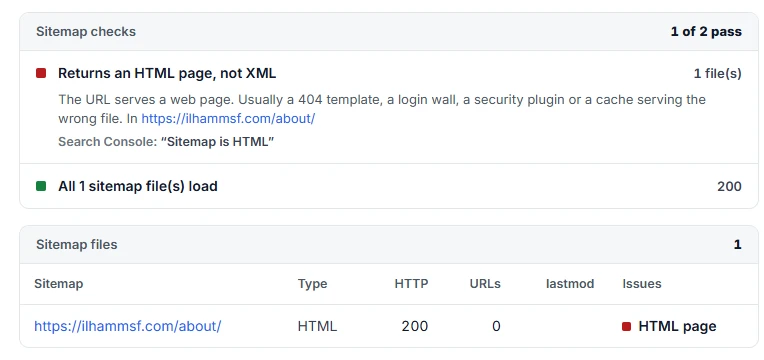
Notice that the status code is 200. A 200 only means the server answered, not that it answered with a sitemap, which is why the status code alone never proves the file is fine.
The defects I see most often:
- A blank line or space before
<?xml version="1.0" encoding="UTF-8"?>. - A missing or misspelled namespace on the
<urlset>or<sitemapindex>tag. - An unescaped
&inside a URL. It has to be written as&. - URLs with spaces or non-ASCII characters that were not encoded.
The sitemap is too large
Google's limit is 50MB uncompressed or 50,000 URLs per sitemap file. Cross either line and processing can fail. The fix is not a bigger file, it is more files: split your URLs into several smaller sitemaps (by section, such as posts, pages, and products) and list them all in a single sitemap index file. Submit the index. Google reads each child sitemap independently, which is faster and far more reliable.
A sitemap index looks like this, and it is the only file you need to submit:
<?xml version="1.0" encoding="UTF-8"?>
<sitemapindex xmlns="http://www.sitemaps.org/schemas/sitemap/0.9">
  <sitemap><loc>https://example.com/post-sitemap.xml</loc></sitemap>
  <sitemap><loc>https://example.com/page-sitemap.xml</loc></sitemap>
  <sitemap><loc>https://example.com/product-sitemap.xml</loc></sitemap>
</sitemapindex>
Splitting has a second benefit: when one child sitemap fails, the Sitemaps report shows you which section is broken instead of failing the whole site.
Broken URLs, redirects, and non-canonical entries
A sitemap should list only final, indexable, 200-status URLs. If it contains pages that 404, redirect elsewhere, or point to non-canonical versions, Google struggles to process it cleanly. Crawl your own site (Screaming Frog's free tier handles up to 500 URLs) and remove any URL that does not resolve to a live, canonical page. Redirect chains and loops are especially damaging, so flatten those too.
Two related habits cause quiet trouble. The first is listing the http version or the www version of URLs when the site lives on https without www, so every entry is a redirect. The second is a <lastmod> stamped with today's date on every URL, or dates in the future. Google has said it uses lastmod only when the dates are consistently accurate, so fake dates teach it to ignore the field for the whole site.
The wrong URL is submitted in Search Console
Sometimes nothing is wrong with the file at all. The path you typed into the Sitemaps report is wrong, points at an old location, or includes a protocol mismatch (http versus https). Double check that the submitted URL matches exactly where the file lives, then remove the broken entry and add the correct one.
Check the property type as well. A URL-prefix property for https://www.example.com/ can only accept sitemaps under that exact prefix, so a sitemap at https://example.com/sitemap.xml will not be accepted there. A domain property covers every subdomain and protocol, which avoids the problem.
A firewall, CDN, or security plugin is blocking Googlebot
This is the cause I find most often on sites where the sitemap "works fine" for the owner. Cloudflare bot rules, a WAF, hosting-level DDoS protection, or a WordPress security plugin decides an automated request looks suspicious and answers with a 403, a 406, a 429 (too many requests), or a JavaScript challenge page instead of the XML. You never see it because you are a normal browser.
To test it, check the sitemap URL from outside your browser session. The indexability checker fetches a URL from a server with a crawler-style user agent and shows the status code it got, any redirects, and whether robots.txt allows the path. If it gets a 403 or a challenge page for your sitemap while your browser gets the file, something between Google and your server is treating automated visitors differently. Look in your firewall or security plugin logs for blocked requests to the sitemap path, and allow verified Googlebot rather than turning protection off.
A cache is serving the wrong file
Page caching and optimisation plugins can store the sitemap like any other page. After you regenerate it, the cache keeps serving the old version, or worse, serves a cached error page from a moment when the sitemap was broken. Some minification settings also mangle XML.
Exclude your sitemap paths (/sitemap.xml, /sitemap_index.xml, /*-sitemap.xml) from page caching and minification, purge the cache, then fetch the sitemap again from outside your browser to confirm you get the current file.
robots.txt blocks the sitemap URL
Google respects robots.txt when it fetches sitemaps. If a rule such as Disallow: /*.xml$ or Disallow: /wp- covers your sitemap path, Google is not allowed to read it. Test the exact sitemap path against your rules in the robots.txt tester, and while you are there, add a Sitemap: line that points to the same URL you submitted:
User-agent: *
Disallow: /wp-admin/
Allow: /wp-admin/admin-ajax.php

Sitemap: https://example.com/sitemap_index.xml
The opposite case is easy to miss, because the Sitemap: line and the rule that blocks it can sit in the same file. In the test below, the robots.txt lists the sitemap at the bottom, but a Disallow: /*.xml$ rule a few lines up blocks every XML file, the sitemap included:
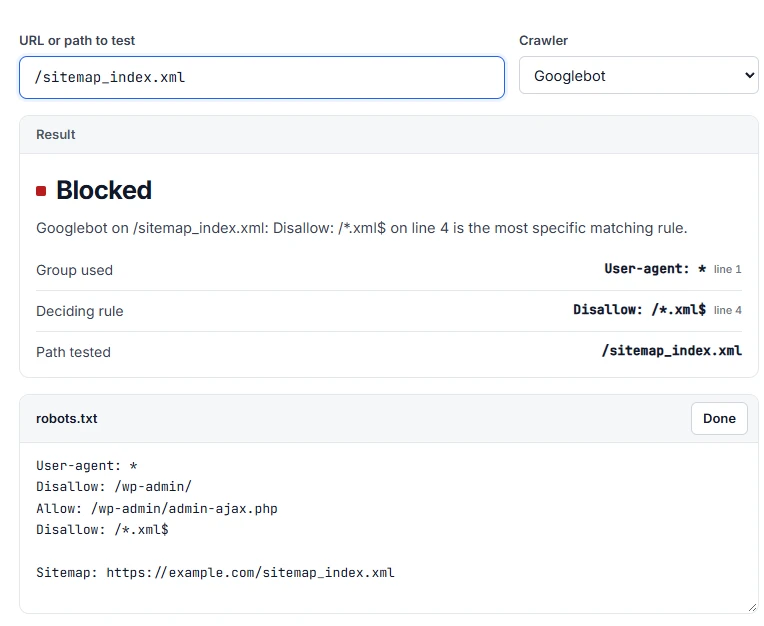
The tester shows which group applied and the exact line that decided the result, so you know which rule to delete instead of guessing.
Platform notes: WordPress, Shopify, Blogger
WordPress. Yoast and Rank Math both serve the index at /sitemap_index.xml. Submit that, not /sitemap.xml, unless the plugin redirects one to the other. If the sitemap suddenly returns a 404 after a plugin change, go to Settings, Permalinks and click Save without changing anything; that rebuilds the rewrite rules the sitemap depends on. Also confirm "Discourage search engines from indexing this site" under Settings, Reading is off, especially after moving from a staging site.
Shopify. Shopify generates /sitemap.xml for you and you cannot edit it. A temporary processing error there is almost always on Google's side or caused by submitting the wrong domain (the myshopify.com address instead of your primary domain). Submit the sitemap on the primary domain property and wait.
Blogger. Blogger also generates /sitemap.xml automatically. If it shows Couldn't fetch, check that you submitted it in the property for the address readers actually use (custom domain versus the blogspot.com address), because Blogger redirects one to the other.
Resubmit the right way
Once you have made a fix, go to the Sitemaps report, delete the failing entry, and submit the corrected URL fresh. Then leave it alone. Processing can take anywhere from a few minutes to a couple of days, and the "Discovered URLs" count will climb gradually. Resubmitting every hour does not help and only makes it harder to tell whether your fix worked.
The full sequence I use:
- Fix the cause and confirm the sitemap returns 200 with valid XML from outside your browser.
- In Search Console, open Indexing, then Sitemaps, and click the failing sitemap.
- Use the menu at the top right to remove the sitemap.
- Submit the exact URL again in "Add a new sitemap".
- Check back the next day. Look at "Last read" and the discovered URL count, not just the status.
Before you resubmit, it is worth one last check that the file really is clean. This is the result you want to see from the sitemap checker: the file loads, the XML is valid, it is within the limits, and the sampled URLs return 200 without redirects or noindex.
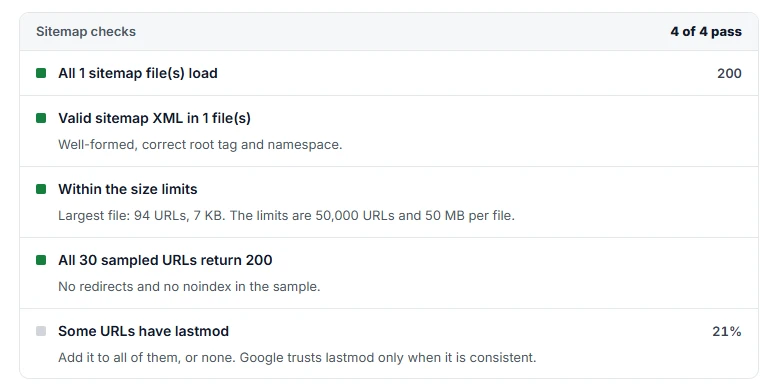
The note at the bottom is a real one for this site: only some URLs have a lastmod date. It does not stop Google from reading the sitemap, but it is worth fixing, because Google trusts lastmod only when it is present and accurate across the board.
If you only saw a temporary processing error and changed nothing, skip all of this and wait. Google's guidance is that resubmitting is only worth it when the error lasts beyond several hours.
Keep it from coming back
The reliable long-term answer is to stop hand-managing your sitemap. Let a trusted generator (Yoast, Rank Math, or your framework's built-in tool) regenerate it automatically whenever content changes, keep your hosting solid enough to answer crawlers on time, and glance at the Sitemaps report every few weeks so you catch problems while they are small.
Frequently asked questions
Is a sitemap temporary processing error bad for SEO?
Not directly. A sitemap does not affect rankings, and Google still discovers pages through your internal links while the sitemap is stuck. The real cost is slower discovery of new pages if the error lasts for weeks.
How long does a sitemap temporary processing error last?
Usually less than a day or two. If it is still there after a week, it is no longer a temporary glitch on Google's side, and one of the real causes in this guide is almost certainly involved.
Should I resubmit my sitemap when I see a temporary processing error?
Google's help page says you generally do not need to, and to resubmit only if the error persists after several hours. Resubmitting repeatedly does not speed anything up.
What is the difference between "Couldn't fetch" and "temporary processing error"?
Couldn't fetch means Google could not download the file at all, which usually points to your server, a firewall, or a wrong URL. A temporary processing error means the problem happened on Google's side during processing and normally clears on the next read.
Why does Search Console say my sitemap could not be read when it opens fine in my browser?
Because your browser is not Google. A firewall or security plugin may block automated requests, a cache may serve an old or broken copy, or robots.txt may disallow the path. Fetch the sitemap from outside your browser session to see what a crawler actually receives.
Why does my Shopify or Blogger sitemap say Couldn't fetch?
Both platforms generate the sitemap for you, so the file itself is rarely the problem. The usual cause is submitting it in the wrong property, such as the myshopify.com or blogspot.com address instead of your custom domain. If the property is right, wait a few days for the next read.
If your sitemap keeps failing and you would rather someone just find the root cause, a website audit will pinpoint exactly what is tripping Google up, or you can get in touch and I will take a look.